netsuite · 2026-2 · netsuite-next
NetSuite November 2026 Release Notes for Admins and Developers
The NetSuite November 2026 release notes add the AI client to System Notes, N/dataStore and Gemini to SuiteScript, and MCP access to Employee Center roles.

TL;DR
- System Notes now shows the client behind AI Connector Service changes, for example
AI Connector Service (openai-mcp/1.0.0). The value comes from the User-Agent header, so the client names itself. - N/dataStore stores JSON documents for SuiteScript 2.1 server scripts without custom records. Not for sensitive data, not supported through SuiteBundler.
- N/llm adds two Google Gemini models. Cohere Command A stays the default, and neither Gemini model supports RAG or image input.
- Employee Center roles can now get the three permissions MCP access needs. Ask Oracle gets two SuitePeople HR skills. The first version of the note listed eight.
- Similar Cases, announced in the October note, has been removed from it, and its help page returns 404.
What's in this article
- Where the AI audit trail used to stop
- The client name in AI Used
- N/dataStore in brief
- Gemini in N/llm
- MCP for Employee Center
- HR skills and core skills in Ask Oracle
- Permissions, banking and analytics
- Similar Cases removed
Until November the audit trail stopped at AI Connector Service
Say an admin opens a customer record because a credit limit changed overnight. System Notes shows the old value, the new value, and a name in Set By: the sales operations lead. The AI Used column says AI Connector Service.
The sales operations lead confirms they asked an AI assistant to tidy up customer data. Which assistant? The record did not say. Since the column arrived in August, "AI Connector Service" was as far as System Notes went for these changes.[2]
The NetSuite November 2026 release notes change that line.
Oracle puts one caveat over the whole page: it "describes functionality available in NetSuite Next," and NetSuite Next "is being made available to customers in phases, so these features may not yet be available in your account."[1] This is a monthly release inside 2026.2, not a version upgrade. What each upgrade from 2027.1 to 2028.2 changes, and where your account shows its upgrade date, is in our NetSuite release timeline.
Below is what matters to admins and developers, checked against Oracle's help pages on November 16, 2026.
The AI Used column now names the client, and the client names itself
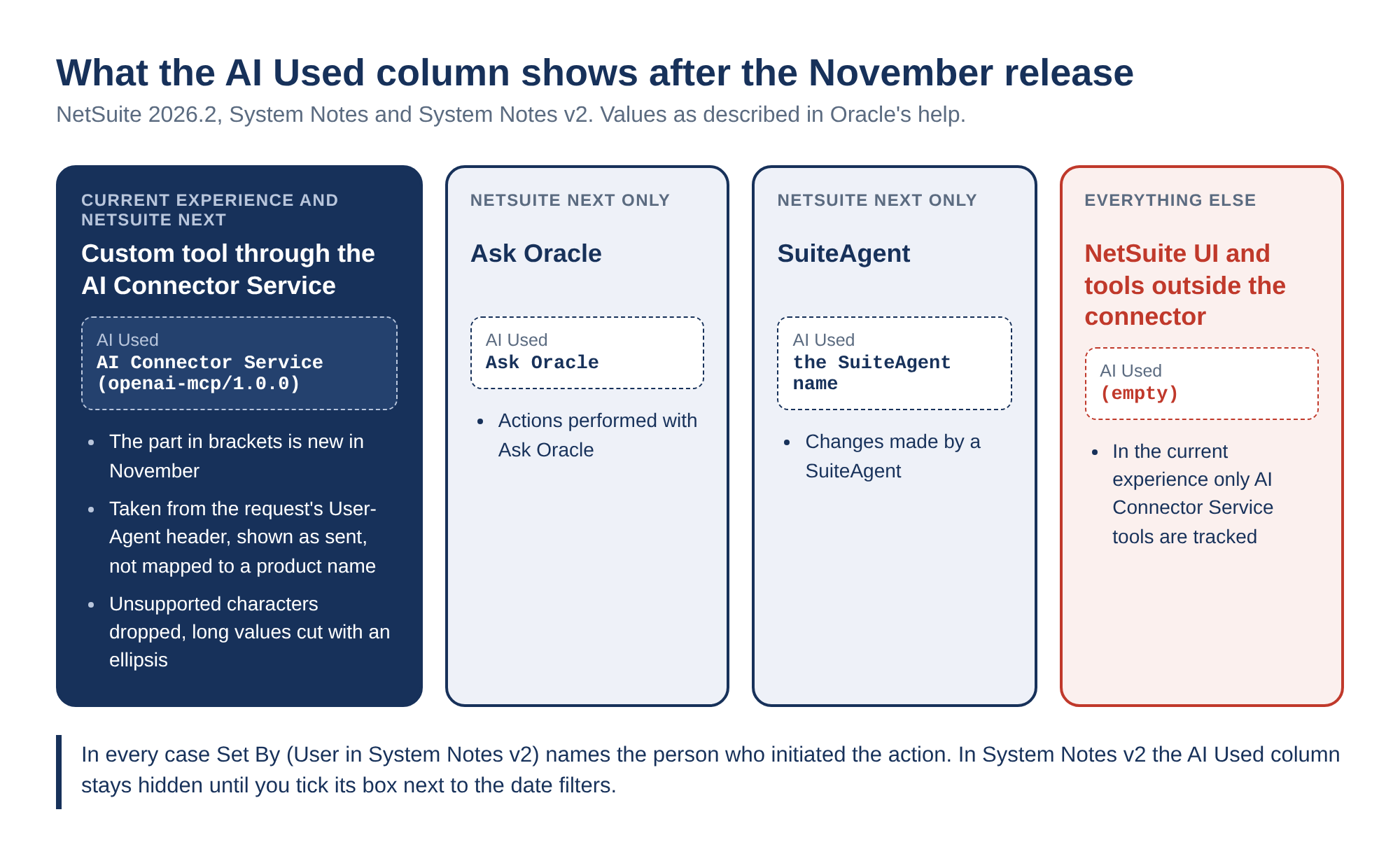
In August, Oracle added the AI Used column to System Notes and System Notes v2. When a record is created, changed or deleted through an AI feature, the column shows the name of the feature. The Set By column in System Notes, and the User column in System Notes v2, still show the person who initiated the action.[2]
In the current NetSuite experience, the column "tracks only changes made by custom tools invoked through the NetSuite AI Connector Service."[3] In NetSuite Next it can also show Ask Oracle or the name of a SuiteAgent.
November adds the client. The AI Used column now "includes client information for record changes made through the NetSuite AI Connector Service."[1] Oracle's description of where that comes from is short:
The information comes from the request's HTTP User-Agent header and appears as, for example, AI Connector Service (openai-mcp/1.0.0).
It applies to SuiteScript-only tools and to tools that use SuiteScript to call REST services. Three display rules follow:
- "Client values are displayed without conversion to product names." What the client sends is what you see.
- Values with unsupported characters are omitted. Long values are shortened and end with an ellipsis.
- "For updates made through the NetSuite UI, the AI Used column remains empty."
| Change made through | AI Used shows | Experience |
|---|---|---|
| A custom tool called through the AI Connector Service | AI Connector Service (client string) |
Current and NetSuite Next |
| Ask Oracle | Ask Oracle |
NetSuite Next |
| A SuiteAgent | The SuiteAgent name | NetSuite Next |
| The NetSuite UI | Empty | Both |
One practical detail before anyone goes looking. In System Notes v2, the AI Used column is not visible by default. You have to check the AI Used box next to the date filter fields.[3]
Our view: turn that column on now, and read the client string as a label, not an identity.
The reason is in Oracle's own sentence. A User-Agent header is set by whatever software sends the request, and any HTTP client can put any value there. Oracle displays it as received. So the column is good at telling honest clients apart, for example a Claude connector from a ChatGPT one, when each sends its usual string. It is weak evidence in an investigation. The part tied to a login is still Set By, the user whose access the client used.
There is also a gap in the other direction. Anything that does not go through the AI Connector Service is outside the column in the current experience. Tools that work inside the browser session, such as MokuBot in its side panel, act as you, so System Notes shows your name and AI Used stays empty. We covered that trade-off, and the case for giving an agent its own role, in NetSuite AI agent permissions.
N/dataStore gives server scripts a JSON store without custom records
The new module "lets you store, retrieve, update, and delete internal application data as JSON documents in SuiteScript 2.1 without requiring custom records."[1] Documents live in collections, and collections live in data stores.[4]
The short version of the module page:
- Scope comes from the running script. Non-SuiteApp scripts share account-scope data. Scripts in the same SuiteApp share data that is separate from the account scope and from other SuiteApps.
- Server scripts only. Every object on the module page lists server scripts as the supported script type.
- Collection methods return Promises. Use
awaitorthen(). - There is a default store. Its identifier is
default, sodataStore.getCollection(id)is the same call asdataStore.getDatastore('default').getCollection(id).
Two restrictions sit in an Important box at the top of the page:
Don't use the N/dataStore module to store sensitive information.
N/dataStore isn't supported in scripts installed through SuiteBundler. A script deployed through SDF can fail if it is later installed as part of a bundle.
For moving such scripts between accounts, Oracle points to Account Customization Projects or Copy to Account. If your release process still ships bundles, check that before the first script that uses the module reaches review.
Methods, limits and governance costs are in our N/dataStore deep-dive.
Gemini joins N/llm, but Cohere stays the default
"The N/llm module now supports the Google Gemini models google.gemini-3.8-flash and google.gemini-3.1-flash-lite." Both work with llm.generateText(options), llm.generateTextStreamed(options) and their promise versions.[1]
The llm.ModelFamily page now lists five models, each under a fixed name and a _LATEST name. The capability columns matter more than the names:[5]
| Enum (and its _LATEST twin) | Model ID | RAG | Preambles | Image processing |
|---|---|---|---|---|
COHERE_COMMAND |
cohere.command-a-03-2025 |
Yes | Yes | No |
COHERE_COMMAND_VISION |
cohere.command-a-vision |
No | Yes | Yes |
GEMINI_FLASH |
google.gemini-3.8-flash |
No | Yes | No |
GEMINI_FLASH_LITE |
google.gemini-3.1-flash-lite |
No | Yes | No |
GPT_OSS |
openai.gpt-oss-120b |
No | Yes | No |
Today each _LATEST enum maps to the same model ID as its fixed twin. The page does not say when they will diverge.
The default did not move. "Cohere Command A is the default model used when the options.modelFamily parameter is omitted." Existing scripts keep calling Cohere, and Gemini only runs when a script asks for it:
const response = llm.generateText({
    prompt: 'Summarize this support case in two sentences.',
    modelFamily: llm.ModelFamily.GEMINI_FLASH_LITE
});
The table is the thing to check before switching. Only Cohere Command lists RAG, which is the options.documents parameter. Only Command Vision lists image processing. A script that passes documents to Cohere today does not get the same capability from either Gemini model.
Cost is the open question. Oracle's AI Units page gives one N/llm example, a renewal reminder email that "could consume from 5-25 AI Units," with no figure per model.[6] Our AI Units pricing write-up tracks what Oracle has and has not published.
Employee Center roles can now connect through MCP
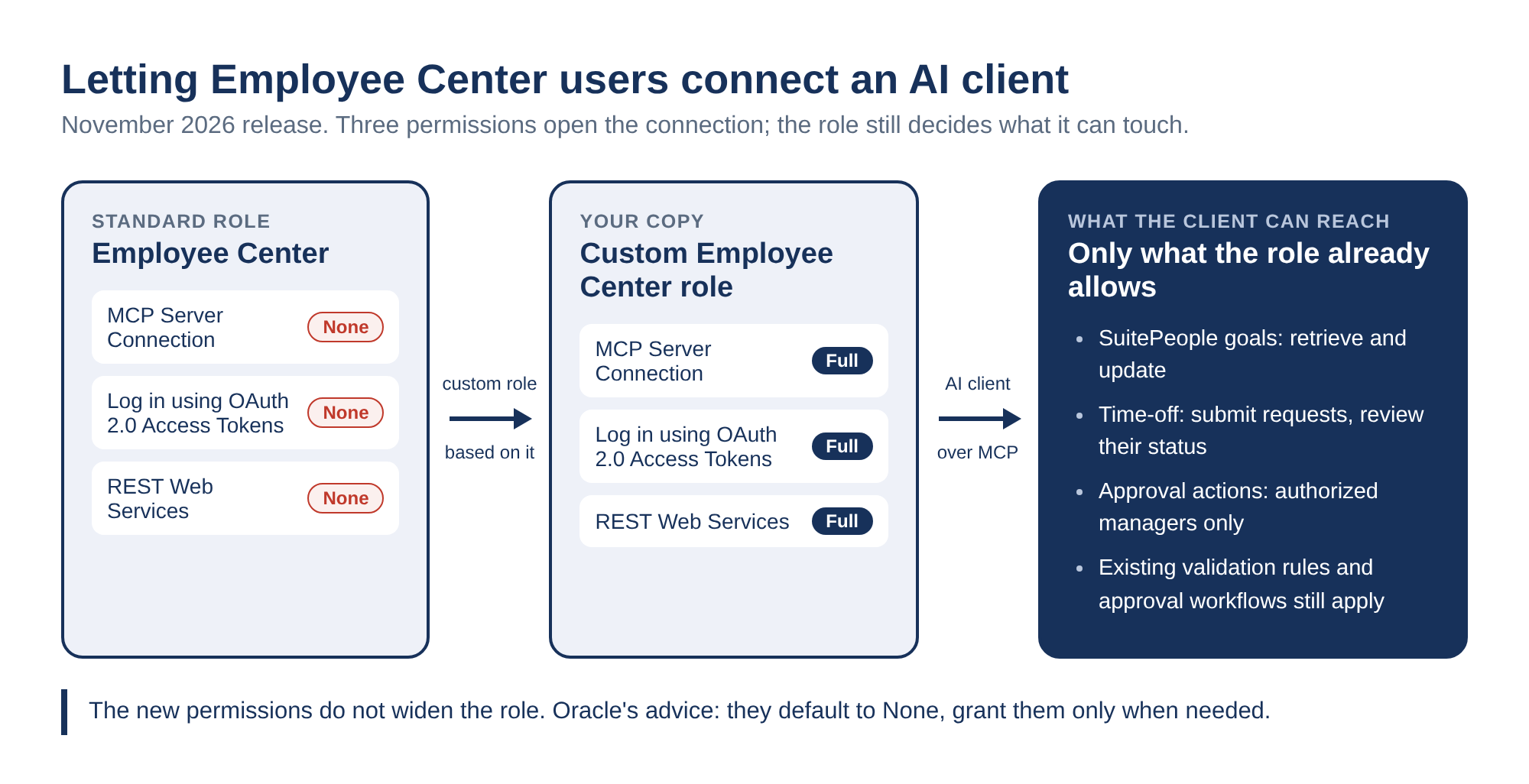
Admins can now customize the Employee Center role so its users can work with NetSuite data through the AI Connector Service. Three permissions must be set to Full:[1]
- MCP Server Connection
- Log in using OAuth 2.0 Access Tokens
- REST Web Services
"These permissions have a default level of None and Administrators should grant them only when needed." The role page adds the mechanics: create a custom role based on Employee Center and raise those three to Full. "The permissions do not provide access beyond the records and actions allowed by the role's existing permissions."[7]
This is the same pattern Oracle used in October for the Specialized User: CRM role.[14]
A second item gives those users something to do. SuitePeople goals and time-off requests are now available through REST for the MCP connector. Users can "retrieve and update goals, submit time-off requests, and review request status, with approval actions available to authorized managers." Existing role permissions, validation rules and approval workflows still apply.[1]
The note says nothing about licensing or AI Units for Employee Center users. If you plan to roll this out, ask your account team rather than reading an answer into the silence.
Each employee given this role becomes a new source of AI Connector changes, labeled in System Notes as described above.
Ask Oracle gets two HR skills, after the note first listed eight
The Employee Management section says "This monthly release includes more SuitePeople HR skills developed for Anthropic that are now available within Ask Oracle." Since November 19 the next sentence reads: "The two skills are: Absence Management Advisor and Expense Close Assistant."[1]
Update, November 20, 2026. When we published this article, the same paragraph listed eight skills. Besides the two above, it named Benefits Portfolio Monitor, FSM NetSuite, Labor Cost Advisor, Payroll Clarity & Readiness, Time Approval Review and Time Entry Creation, and it ended with "Each skill must be validated in Ask Oracle." Oracle edited the note on November 19 and removed the six names and the validation line. The note does not mention the change. We found no help page for any of the six on November 16, and the Ask Oracle pages cited below still list only the two. We would not plan around the other six until Oracle documents them.
Both remaining skills appear in the November list of new core skills on What's New in Ask Oracle, as Absence management advisor and Expense close assistant.[8] They also have rows on the People and Expense Management page. The absence skill provides "factual, read-only insights." The expense skill produces a worklist "without changing records."[9]
The same What's New page lists fifteen new core skills in total. Several describe output that stops short of a live record:
- Price rule creation "Creates inactive price rules" for "review and manual activation."
- Return authorization assistant "prepares supported standalone return authorization drafts for review."
- Knowledge quality assistant prepares "drafts for review."
The Core Skills page carries its own warning: core skills "are designed for NetSuite Next and may not be available or work as expected in the current NetSuite experience."[10]
Narrative insights also reach Opportunity records, and the help page describes one way in: Ask Oracle. A prompt such as 'Create a narrative insight for opportunity OPP12345.' produces the insight in an AI Canvas next to the chat. It depends on the Enable Narrative Insights preference in the Narrative Insights subtab of Agent Preferences, which "is enabled by default." Oracle notes that the content "may contain inaccuracies or omissions."[11] How Narrative Insights first moved into Ask Oracle is in our September Ask Oracle article.
The smaller changes touch permissions, banking and analytics
| Change | What Oracle says | Who should look |
|---|---|---|
| Messages permission renamed | Messages for Analytics and REST is now Search and Query All Company Messages. It covers all company messages "through SuiteQL queries and Message saved searches." Non-admins need Track Messages as well.[12] | Anyone with SuiteQL or saved searches over messages |
| ODBC driver 9.0.37.0 for Windows | Available as of November 16, 2026. It "includes important security fixes," and Oracle strongly recommends upgrading. | SuiteAnalytics Connect admins |
| NSAW is now NSDI | NetSuite Analytics Warehouse is renamed NetSuite Data Intelligence, and the Data Warehouse Integrator role is now Data Integrator. Some help topics still use the old name. | Analytics admins |
| NSDI inside NetSuite | Dashboards at Analytics > NSDI > Dashboards without a separate sign-in. Transferring a SuiteAnalytics dataset creates a workbook in Oracle Analytics Cloud. | Analytics admins |
| AI Companion SuiteApp | Four tabs: Home, Prompt Library, Plugins, Skills and Tools, and Support, at Setup > AI Companion Tools > AI Companion Library. | AI Connector users |
Source for every row without its own link: the November note.[1]
Bank import plug-in developers get the change with a trap in it. The Bank Import API can now process several statement files per run through a new getTransactionSources() entry point, "up to 100 eligible files per format profile, ordered from newest to oldest." Results and errors are tracked per file, and plug-ins without the entry point keep the existing import flow.
The method page adds two lines worth reading twice.[13] Returning an array from getTransactionSources() does not supply the source list; you call context.addSourceList(). And past 100 sources across all those calls, "Additional entries are ignored without an error in Bank Import History or the logs." Nothing records that the extra files were skipped, so keeping the list at 100 or fewer is the plug-in's job.
Similar Cases was announced in October and then removed
The October note had a CRM item titled "New AI-Powered Similar Cases Feature Enhances Support Case Resolution." Clicking Generate Insight on a case opened a Similar Cases tab with "a table of up to five related cases," all closed, each with a similarity score. Only cases closed after October 7, 2026 were indexed, and the Support Case - View permission was required.
By November 13 that item was gone from the October note. We found it by comparing our saved copy of the page with the live one.[14] The feature's help page (article_0521052634) returned 404 when we checked on November 16, and the November note does not mention Similar Cases at all. Oracle has given no reason.
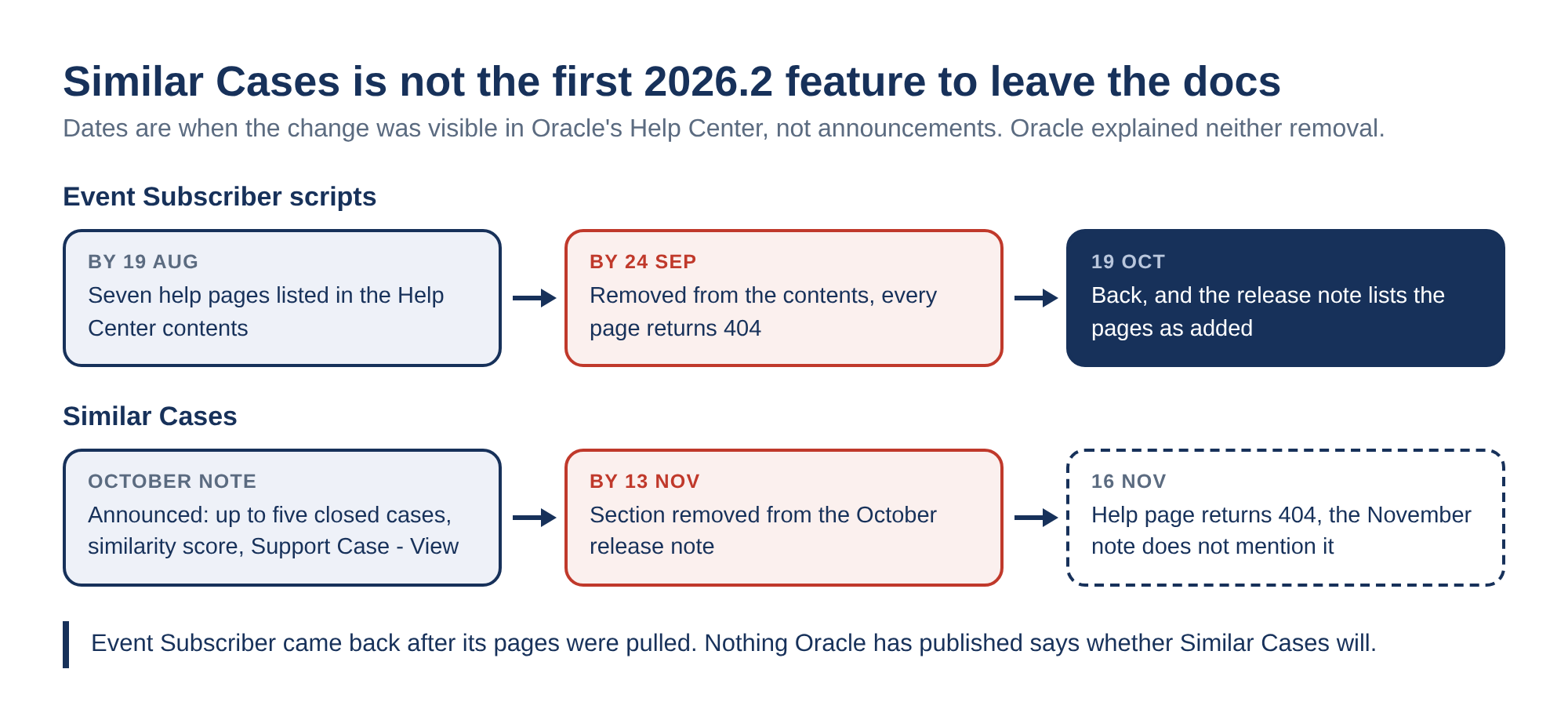
It is the second 2026.2 feature to leave the docs this way. Event Subscriber pages disappeared from the Help Center in September and came back on October 19, as we described in what happened to Event Subscriber. Nothing Oracle has published says whether Similar Cases will follow the same path.
Sources
- November Monthly Release, NetSuite 2026.2
- August Monthly Release, NetSuite 2026.2
- Viewing System Notes for Changes Made by AI Features
- N/dataStore Module
- llm.ModelFamily
- NetSuite AI Units and NetSuite Features
- About the Employee Center Role
- What's New in Ask Oracle
- People and Expense Management
- Core Skills
- Generating Opportunity Insights
- Permissions for Accessing Message Records
- getTransactionSources()
- October Monthly Release, NetSuite 2026.2