netsuite · suitescript · suitescript-2-1
SuiteScript N/dataStore: when to use it instead of a custom record
N/dataStore keeps JSON documents without a custom record. Oracle's limits, governance and query rules, and the cases where a custom record still wins.

TL;DR
- N/dataStore arrived in the November monthly release for NetSuite 2026.2. It stores JSON documents in collections from server-side SuiteScript 2.1, with no custom record type behind them. It ships under the NetSuite Next banner, which Oracle is rolling out in phases.
- A document can be 10 MB. insertOne, findOne, updateOne and deleteOne cost 2 units each. find, the batch methods and every extra cursor group cost 10. Governance is roughly level with a custom record, so size and shape are the reason to switch, not cost.
- Every call commits on its own. Nothing rolls back with the record or the script, and after DATA_STORE_OUTCOME_UNKNOWN Oracle says not to retry automatically, because an
$inccan land twice. - Oracle documents no way to see the data in the UI, a saved search or SuiteQL, and no switch that enables the module. If a person has to read it, report on it or audit it, keep it in a custom record.
- Not for sensitive information, and not for scripts installed through SuiteBundler.
What's in this article
- The script decides which scope the data lands in
- The limits fit state, and the quota is not documented
- Governance is roughly level, size is the difference
- Every call commits on its own, and a retry can count twice
- Queries are strict about types and quiet about operators
- Pick the store by who has to read the data
- Where N/dataStore stops
A scheduled script keeps its sync state in a custom record: one Long Text field, a JSON string, then a load, a parse, a stringify and a save on every run. The record form tells you the field holds 1,000,000 characters. Through SuiteScript it holds 100,000, and the script is the only thing that ever writes to it (Field Type Descriptions for Custom Fields).
NetSuite 2026.2 now has a place built for that JSON. The November monthly release added N/dataStore, a SuiteScript 2.1 module that "stores internal application data as JSON objects, called documents, without requiring custom records" (N/dataStore Module). A document can be 10 MB. Reading one costs 2 units. The rest of that release is in our November 2026 release notes.
What follows is a reading of Oracle's help pages as they stood on 16 November 2026. A web search that day turned up no forum threads or blog posts about the module, so there is no field experience to lean on yet. The code uses only signatures Oracle documents, and it is illustrative and untested: we have no account with the module enabled to run it in. Where the documentation is silent, the article says so.
The script decides which scope the data lands in
Every document lives in a collection, every collection in a data store, and every data store in a storage scope. You do not choose the scope. "The executing script determines which storage scope the API uses." Scripts that are not part of a SuiteApp share account-scope data. Scripts in the same SuiteApp share data that is "separate from account-scope data and data belonging to other SuiteApps" (N/dataStore Module).
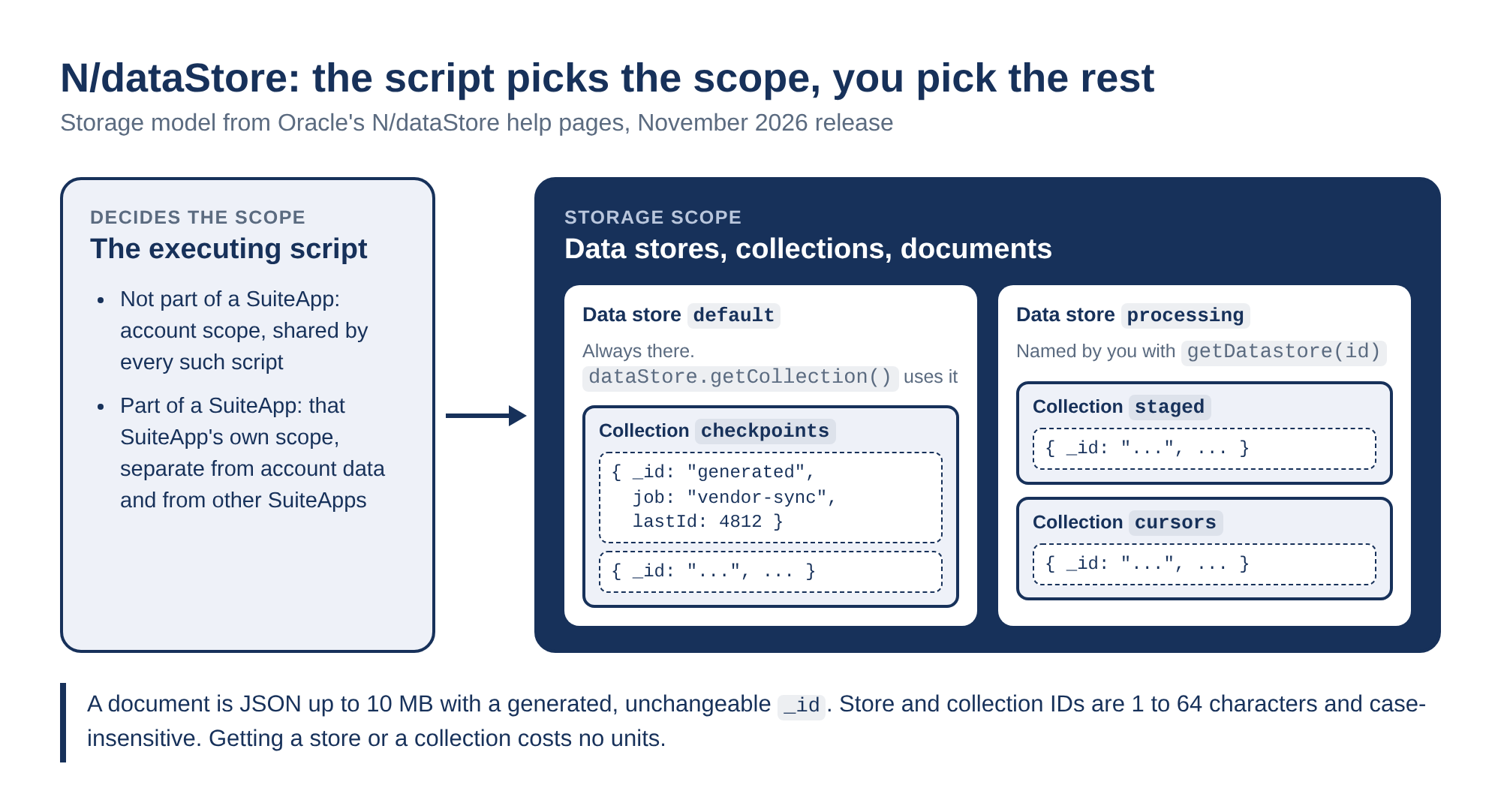
There is always a data store called default, so dataStore.getCollection('checkpoints') and dataStore.getDatastore('default').getCollection('checkpoints') return the same collection. Neither call reads or writes a document, and both cost nothing in governance. Store and collection IDs are 1 to 64 ASCII letters, digits, underscores, dots or hyphens, and they are case-insensitive (dataStore.getDatastore(id)). Checkpoints and checkpoints are the same collection.
Each document gets a generated string _id that never changes. Do not pass _id on insert, and do not expect your input object to gain one. It comes back in the result (dataStore.Document).
The collection methods return Promises. Server-side Promise support in SuiteScript 2.1 covers seven modules: N/dataStore, N/http, N/https, N/llm, N/query, N/search and N/transaction. N/record is not on the list, and "using Promises with unsupported module APIs results in an error" (Promises in SuiteScript 2.1 Server Scripts). Oracle's only complete sample is a Suitelet with an async onRequest (N/dataStore Module Script Samples). The pages do not say which other entry points may be async, so the samples below are Suitelets as well.
The limits fit state, and the quota is not documented
| Limit | Value | Oracle page |
|---|---|---|
| Document body | 10 MB (10,485,760 bytes), _id not counted |
Document |
| Property path inside a document | 4,000 bytes | Document |
| Numbers | 0, or an absolute value from 1e-130 up to 1e126 (exclusive) | Document |
| Dates | Saved as UTC ISO 8601 strings, read back as strings | Document |
| One insertMany call | 10 MB of document bodies combined | insertMany |
| One cursor group | 100 documents or 10 MB | Cursor |
| One query | 300 operators (implicit ones count), 100 values per $in, 32 names per dot path, 256 bytes per path, 4,000 bytes per string value |
Query Limits |
| One find | 32,000 bound parameters | find |
Values can be strings, finite numbers, booleans, null, nested objects and arrays. Functions are refused. Property names cannot be empty, contain a dot, start with $, or be __proto__, constructor or prototype (dataStore.Document).
The missing row matters more than any of these. Oracle publishes no total storage per account, per scope or per collection, and no cap on how many data stores or collections a scope may hold. A design that writes one document per transaction line is betting on a number nobody has published.
Governance is roughly level, size is the difference
The method pages put the costs here, and they match the SuiteScript governance table (SuiteScript 2.1 API Governance):
| Store | Largest item | Write | Read | Survives | Sources |
|---|---|---|---|---|---|
| N/dataStore document | 10 MB | insertOne 2, updateOne 2, insertMany 10 | findOne 2, find 10 per group | Yes | Collection |
| Custom record with a Long Text field | 100,000 characters through SuiteScript | create 2 plus save 4, submitFields 2 | lookupFields 1, load 2 | Yes | Long Text, governance |
| N/cache | 500 KB value, 4 KB key | put 1 | get 1, or 2 with a loader | No | Cache.put |
| JSON file in the File Cabinet | 10 MB held in memory | create none, save 20 | load 10 | Yes | N/file |
| Script parameter | Not compared | Cannot be written from SuiteScript | getParameter none | Yes | Script parameters |
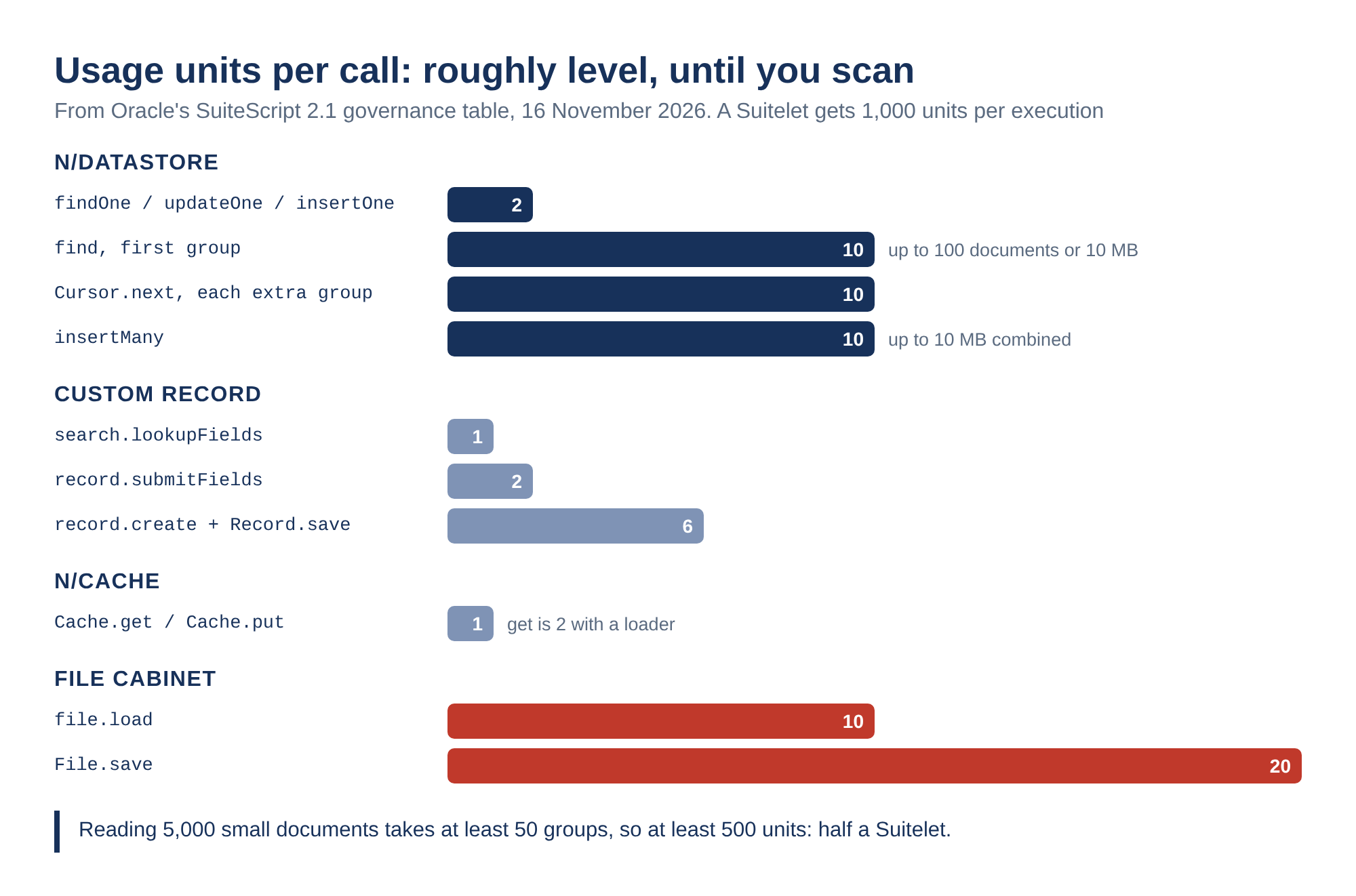
Read the custom record row closely. A checkpoint that already exists costs 3 units to read and update as a custom record (lookupFields plus submitFields) and 4 as a document (findOne plus updateOne). N/dataStore only comes out ahead on creation, 2 units against 6, and on bulk inserts, where one insertMany costs 10 no matter how many documents fit under the 10 MB ceiling. Against a 1,000-unit Suitelet, neither difference decides anything (Script Type Usage Unit Limits).
The size column does. 100,000 characters of Long Text against 10 MB of structured JSON is a hundredfold gap, and N/cache is not a store at all: the value "may be removed before the ttl limit is reached" and "Cached data is not persistent" (Cache.put(options)). A File Cabinet file holds the same 10 MB in memory, but each read costs 10 and each save 20, and every change rewrites the whole file.
Reading many documents is where the cursor counts. find costs 10 for the first retrieval and Cursor.next costs 10 each time it has to fetch another group (Cursor.next()). A group holds up to 100 documents or 10 MB, whichever comes first, so a scan of 5,000 small documents is at least 500 units. That is half a Suitelet.
Every call commits on its own, and a retry can count twice
This is the sentence to read twice: "Each call saves its changes independently of the surrounding record or script transaction. Changes saved by one call aren't rolled back if a later call fails" (dataStore.Collection). A user event that writes a document and then throws leaves the document written.
Inside one call the rules are tighter. insertMany, updateMany and deleteMany save everything they selected or roll all of it back, and they "don't return partial-success results" (dataStore.Collection). An update that fails on a bad increment target, an out-of-range number or an oversized result is rolled back whole (Data Store Update Rules and Limits).
Two error codes change how you retry:
| Code | Oracle says | What to do |
|---|---|---|
| DATA_STORE_OUTCOME_UNKNOWN | Changes "may have been saved. Don't retry automatically." | Read the document and check before you repeat the call |
| DATA_STORE_COMMITTED_RESULT_UNAVAILABLE | Saved, but the result could not be returned. "Don't retry the operation." | Treat it as done |
Oracle adds the warning that matters for counters: "Retrying an update that uses $inc could apply the increment twice" (dataStore.Collection). And $inc does not create the field: "$inc requires an existing numeric property" is the error for a missing or nonnumeric target (Collection.updateOne(query, update)).
Here is a checkpoint written that way. Illustrative and untested:
/**
 * @NApiVersion 2.1
 * @NScriptType Suitelet
 */
define(['N/dataStore'], function (dataStore) {
    async function onRequest(context) {
        const checkpoints = dataStore.getDatastore('processing').getCollection('checkpoints');

        // Parameters arrive as strings, and queries are type-strict.
        const lastId = Number(context.request.parameters.lastId);
        if (!Number.isFinite(lastId)) {
            context.response.write('lastId must be a number');
            return;
        }

        const found = await checkpoints.findOne({ job: 'vendor-sync' });
        if (found.document === null) {
            // runs starts at 1 so that $inc has a number to add to later.
            const created = await checkpoints.insertOne({ job: 'vendor-sync', lastId: lastId, runs: 1 });
            context.response.write('Created ' + created.insertedId);
            return;
        }

        try {
            const result = await checkpoints.updateOne(
                { _id: found.document._id },
                { $set: { lastId: lastId }, $inc: { runs: 1 } }
            );
            context.response.write('Updated ' + result.updatedCount + ' from version ' + found.metadata.version);
        } catch (error) {
            // After DATA_STORE_OUTCOME_UNKNOWN the $inc may already be saved.
            // Read the document again before deciding to repeat the update.
            context.response.write('Update failed: ' + error.name + ': ' + error.message);
        }
    }
    return { onRequest };
});
The findOne-then-insertOne pair is two calls, not one. Oracle documents no upsert and no unique constraint, so nothing in the documentation stops two executions that run at the same moment from both inserting. DocumentMetadata.version starts at "1" and goes up on every update (DocumentMetadata.version), but no method accepts it as a condition, so there is no documented optimistic lock. Custom records have one. Enable Optimistic Locking is on by default for every custom record type created as of 2012.2, and the losing save fails with "Record has been changed" (Enabling Optimistic Locking for Custom Records).
Queries are strict about types and quiet about operators
A query is a plain object: direct matches, operator conditions such as { attemptCount: { $gte: 0, $lt: 3 } }, $and and $or groups, and dot notation like 'profile.country'. Several properties combine as AND, and {} matches everything (Data Store Query Object). The rules underneath are where scripts go wrong (Data Store Query Rules):
- Matching is type-strict and case-sensitive.
"5"does not match5, and'pending'does not match'Pending'. { field: null }matches null, or null inside an array, but not a missing field.$exists: truematches a present field even when it holds null.- "A condition using $ne: null doesn't match any field value." It returns nothing, not the non-null rows.
- Dates are compared as the strings they were saved as. Oracle does not say how strings order, so an epoch number is the safer field to range over.
- Objects and arrays cannot be compared whole. Array indexes and JSONPath are not supported, and for
$elemMatch"the same array element must satisfy the defined conditions" (Data Store Array Queries). The method pages list "Nested $elemMatch isn't supported" as an error.
Updates are narrower still. "Only $set, $unset, and $inc are supported for updates," and an update object "specifies changes to top-level properties" (Data Store Update Object). Update property names cannot contain dots (Data Store Update Rules and Limits), so changing one key inside a nested object means sending the whole object again with $set.
Now the gap. Oracle's Query Operators, Array Queries, Update Operators and Update Rules and Limits pages each introduce a table ("The following table lists the supported operators…") and then show none. A second fetch on 16 November returned the same pages. So the complete operator list is not published. The operators named here come from Oracle's examples and from error messages, such as "Use $and or $or for logical query operations," which the find page lists for a query that uses any other logical operator (Collection.find(query)).
One method deserves its own warning. deleteMany({}) is valid, and "An empty query object ({}) deletes all documents in the collection" (Collection.deleteMany(query)). A filter built from a request parameter that comes back empty is one bad deployment away from that call.
Pick the store by who has to read the data
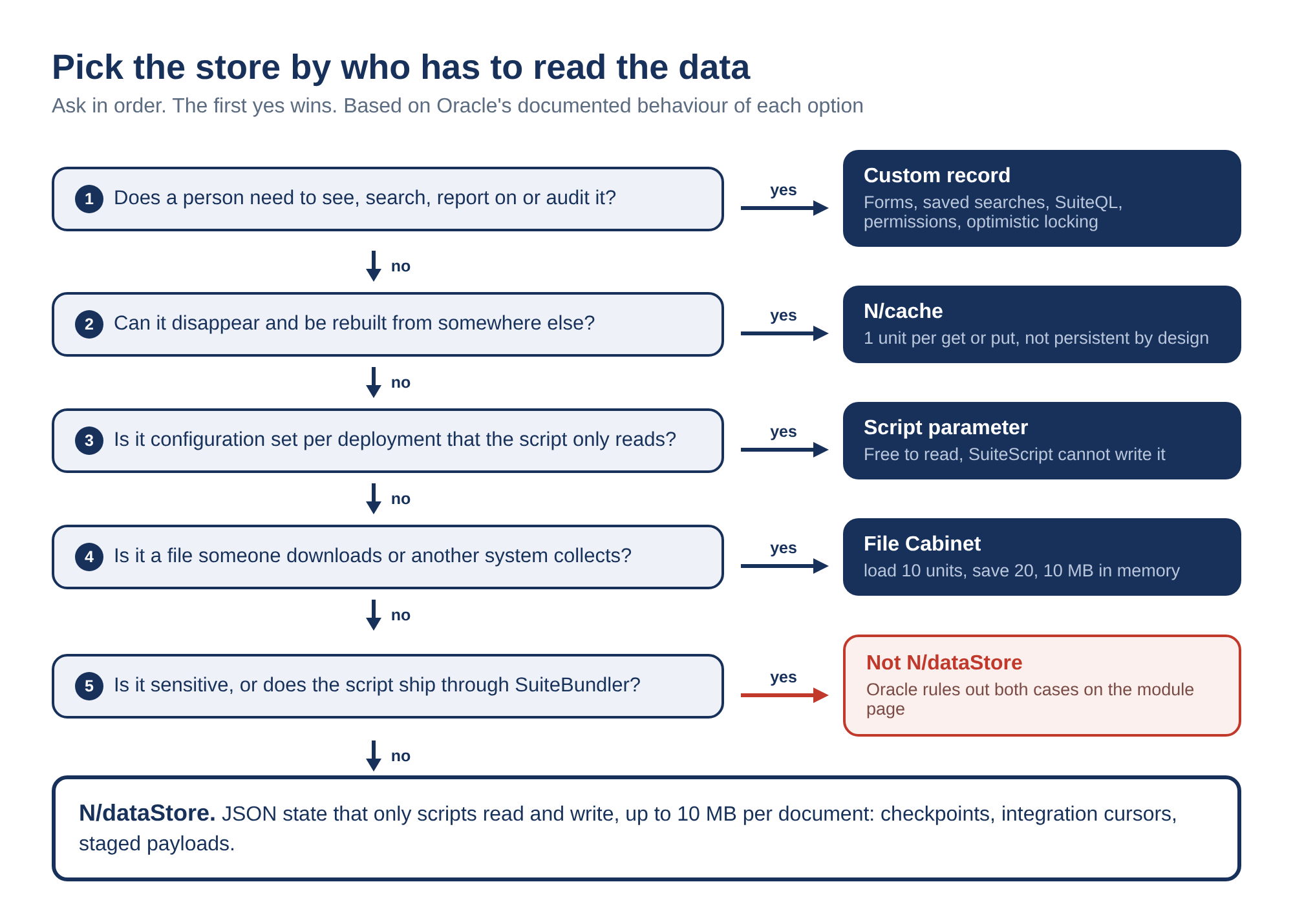
| The data is | Use | Because |
|---|---|---|
| Something a person views, reports on, searches or audits | Custom record | Forms, saved searches, SuiteQL, role permissions and optimistic locking are all documented for it |
| A lookup that can disappear and be rebuilt | N/cache | 1 unit per get or put, and it is not persistent by design |
| Configuration set per deployment and only read by the script | Script parameter | Free to read, and SuiteScript cannot write it |
| A file someone downloads, or another system collects | File Cabinet | File semantics, 10 MB in memory, more when streamed on save |
| JSON state read and written only by scripts, under 10 MB, not sensitive, not bundled | N/dataStore | Structured documents, 2-unit single reads and writes, no record type to maintain |
My view is that N/dataStore belongs to script-internal state, such as checkpoints, integration cursors and staged payloads, and to nothing a human has to answer for. The day someone asks why the sync skipped an invoice, the record of what the script believed should be somewhere they can open, filter and export. Oracle documents that place for custom records and documents nothing like it for N/dataStore.
Where N/dataStore stops
Oracle lists the hard stops in the module page (N/dataStore Module):
- "Don't use the N/dataStore module to store sensitive information."
- "N/dataStore isn't supported in scripts installed through SuiteBundler. A script deployed through SDF can fail if it is later installed as part of a bundle." To move scripts between accounts, Oracle points to Account Customization Projects or Copy to Account. The find page lists DATA_STORE_BUNDLE_NOT_SUPPORTED for exactly that case.
Availability is the next stop. The November note carries the NetSuite Next banner: "NetSuite Next is being made available to customers in phases, so these features may not yet be available in your account" (November Monthly Release). The error table includes DATA_STORE_NOT_ENABLED, "The N/dataStore API isn't enabled for this account," but no page we found says what enables it.
Visibility is the last one, and it is the one that shapes designs. No page describes stored documents in the UI, a saved search, SuiteQL, or an export. Until Oracle documents one, the way to see a collection is a script that reads it. Illustrative and untested:
/**
 * @NApiVersion 2.1
 * @NScriptType Suitelet
 */
define(['N/dataStore'], function (dataStore) {
    async function onRequest(context) {
        const collection = dataStore.getDatastore('processing').getCollection('checkpoints');
        const cursor = await collection.find({});
        const rows = [];
        for await (const result of cursor) {
            rows.push({
                id: result.document._id,
                job: result.document.job,
                bytes: result.metadata.byteLength,
                version: result.metadata.version
            });
            if (rows.length === 200) break; // leaving the loop early calls cursor.return()
        }
        context.response.write(JSON.stringify(rows, null, 2));
    }
    return { onRequest };
});
At full groups that is 20 units for 200 documents. MokuBot can write and deploy a Suitelet like this inside your account and read its execution log with you, but it has no other window into a collection either. Results come back ordered by _id, and Oracle notes that "Changes to stored documents during retrieval can affect later results," so a listing taken while a scheduled script is writing is a moving picture, not a snapshot (Collection.find(query)).