netsuite · suiteskills · mcp
NetSuite Plug-ins for Claude and ChatGPT: What They Install and What They Cost
The NetSuite plug-ins for Claude and ChatGPT are skill packs. Data still flows through the AI Connector, a free SuiteApp and a role you set up in NetSuite.
TL;DR
- The NetSuite plug-ins for Claude and ChatGPT are skill packs: instructions that tell the model which tools to call. Three have been on GitHub since August 10. SuiteSkills, with 48 runbooks, arrived on October 22, and the Help Center now lists all four.
- The data still comes through the NetSuite AI Connector. That means features, a non-Administrator role, an integration record and a free SuiteApp inside your account.
- On that route NetSuite charges nothing and no AI Units are consumed. You pay for your Claude or ChatGPT plan. Inside Ask Oracle the same kind of work is metered, AI Units still have no public price, and when they run out AI use stops: Oracle bills no overage.
- The tool catalog is labeled read-only, but 17 of the 48 runbooks are marked
operation_dependent, and the server they talk to offers 25 tools, record writes included. The role you authorize is the real control, so build a dedicated one before anyone installs. - Since the November release, System Notes show which AI client made a change, taken from its User-Agent: a useful label, not proof. Most of the rest of the keynote still needs NetSuite Next, and that rollout is phased.
What's in this article
- The plug-ins are skill packs, and most of them shipped in August
- What the AI Connector needs inside your account
- Installing the plug-in in each AI client
- 48 runbooks, 16 read-only tools, 25 on the server
- What it costs: your AI plan, not AI Units
- What is live after SuiteWorld and what is planned
- A dedicated role before anyone installs
- Auditing: the Execution Log and AI Used in System Notes
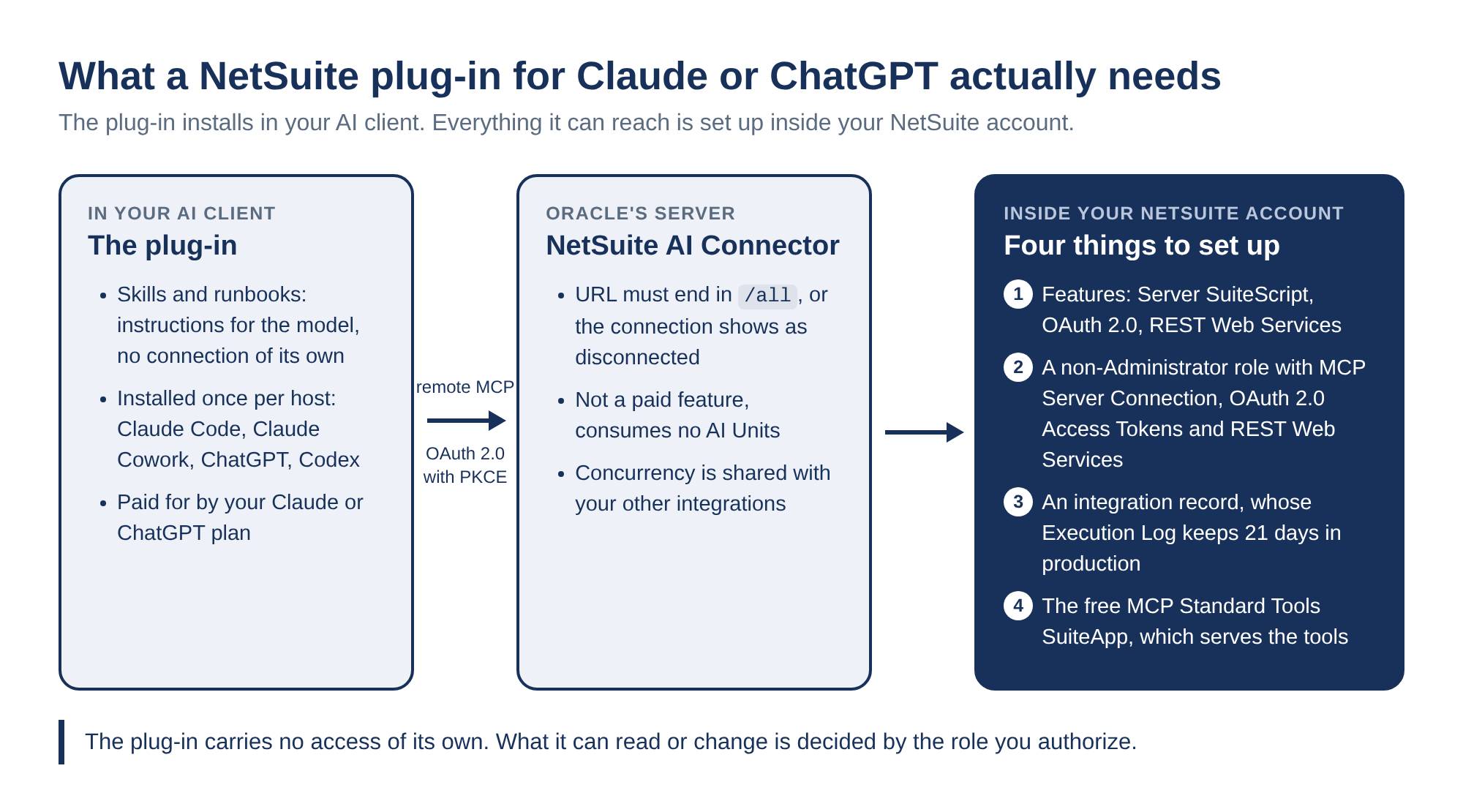
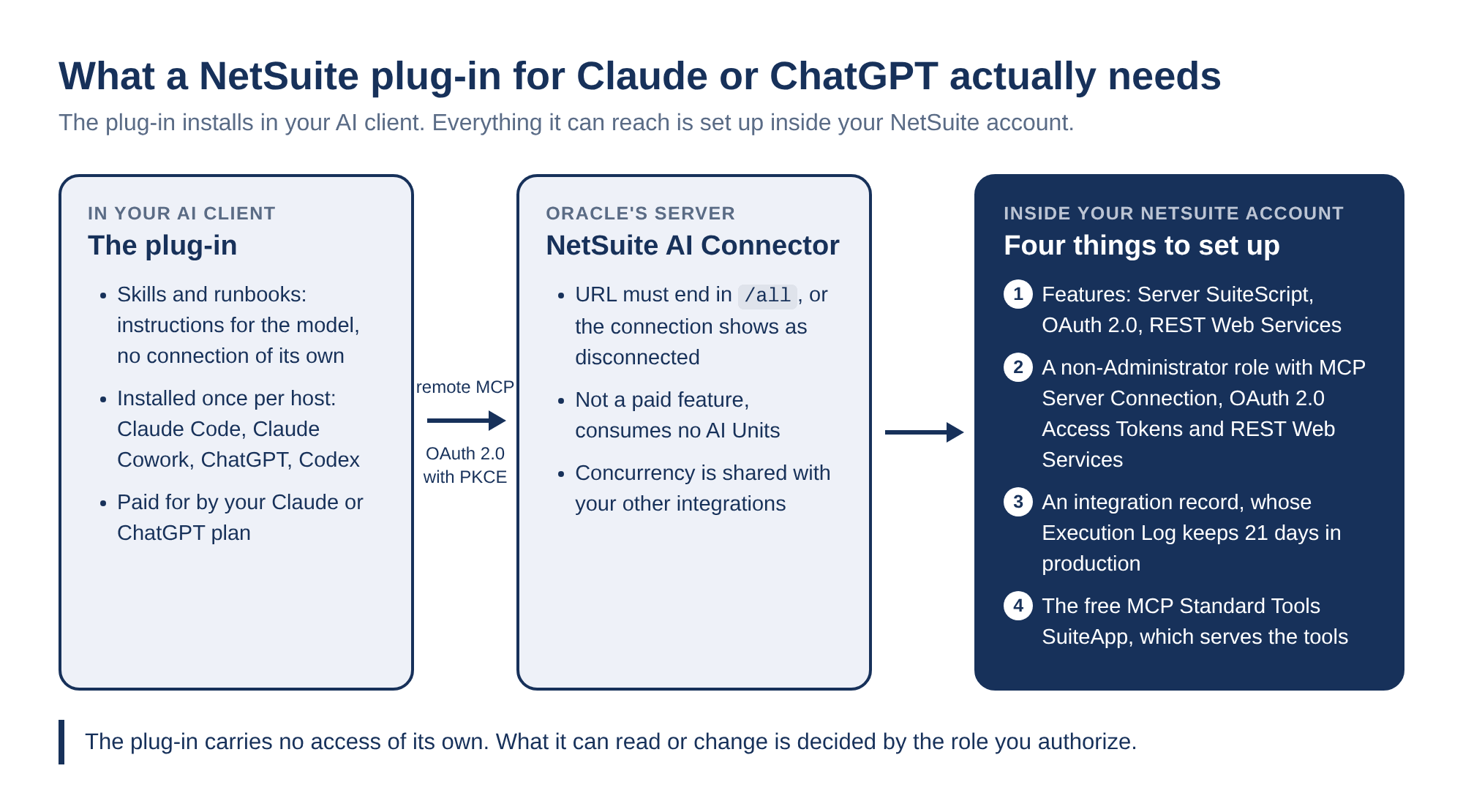
Claude says the NetSuite connector is connected. The connector says it is disconnected. Oracle's own AI Connector FAQ lists that exact contradiction, and the first cause on its list is four characters long: the server URL is missing /all at the end. "Without /all at the end, the connection will appear disconnected."
The plug-ins Oracle announced at SuiteWorld for Claude and ChatGPT install from a marketplace in a few clicks. Everything a plug-in needs to see a single NetSuite record is somewhere else: in your account, on a role, behind an integration record. This article follows each piece: where it installs, what it can do, who pays, and what it leaves behind in your audit trail.
The four plug-ins are skill packs, and three of them shipped in August
Oracle's Help Center defines them in one line: "AI Agent Plug-ins are installable packages of skills for supported AI platforms" (AI Agent Plug-ins Introduction). A skill is a folder of instructions. It tells the model which tools to call, in what order, and how to present the result. It does not carry a connection to anything.
The repository README lists four plug-ins:
netsuite-ai-companion: the AI Connector Instructions skill. Tool-selection order, output formatting, multi-subsidiary and currency handling, SuiteQL safety.netsuite-finance-analyst: reporting, period close, variance, aging, reconciliation reviews, cash.netsuite-suiteskills: "five skills and 48 business runbooks across Finance, Operations, Customers & Sales, and Workforce, with guided onboarding."netsuite-suitecloud: developer skills for SuiteScript, SDF, UIF SPAs, security and permissions.
When we first wrote this up on October 28, the Help Center page listed three and left SuiteSkills out. It now lists all four. The release note, updated November 16, describes SuiteSkills as "48 business skills in five categories: Customers & Sales, Finance, Onboarding, Operations, and Workforce." The repository counts the same plug-in differently: 48 runbooks in four areas, plus an Onboarding skill that routes requests to them.
The plug-ins package was merged to master on August 6 in PR #1091. The first build landed on the ai-plugins-dist branch on August 10, and it already held all three: AI Companion, Finance Analyst and SuiteCloud, each in an Anthropic and an OpenAI version.
The SuiteSkills plug-in arrived on October 22 in PR #1189 and was published to the dist branch the same afternoon. The keynote and the press releases are dated October 26. The dist branch has not moved since. The only later commit to the package, on November 11, adds contributor notes in an AGENTS.md file (commit history).
So the "Claude and ChatGPT plug-ins" announced at SuiteWorld are mostly older than the show. What SuiteWorld added is the fourth one.
One trap if you go looking. The SuiteSkills press release says the skills are "available to all NetSuite customers for download from GitHub", but its GitHub link points to packages/agent-skills, which holds the standalone AI Connector Instructions, Finance Analyst and developer skills. The 48 runbooks live in packages/ai-plugins.
The data comes through the AI Connector, and that part lives in your account
The install page has a one-sentence prerequisite section: "The business user plug-ins require the NetSuite AI Connector Service to access NetSuite data." The AI Connector is a remote MCP server at:
https://<accountid>.suitetalk.api.netsuite.com/services/mcp/v1/allThe tools it serves come from the free MCP Standard Tools SuiteApp (com.netsuite.mcpstandardtools) or from custom tools you build. Setting it up, per the FAQ, touches four places:
- Features. Server SuiteScript, OAuth 2.0, and REST Web Services (the last one is required for the Standard Tools SuiteApp).
- A role. MCP Server Connection, OAuth 2.0 Access Tokens, and REST Web Services. It cannot be Administrator: "For better access control and security, the NetSuite AI Connector service does not support Administrator roles."
- An integration record. Often created automatically on the first connection and visible under Setup > Integration > Manage Integrations. It can sit in a pending state until someone enables it, and "For ChatGPT, new integration may be required for each connection (due to dynamic callback URLs)."
- The SuiteApp. Without it, the FAQ's troubleshooting section is the next page you will read: "I don't see any tools."
On the client side, the AI tool has to support remote MCP, protocol version 2025-06-18, streamable HTTP, and OAuth 2.0 Authorization Code Grant with PKCE. The FAQ adds: "Claude Pro and ChatGPT are currently supported, but some AI clients or their versions require extra setup. For example, some ChatGPT plans require Developer Mode to use MCP connectors."
The SuiteSkills release says "More than 13,000 customers have already adopted the NetSuite AI Connector Service." If you are one of them, the plug-ins are a small step. If you are not, the plug-in is the last step of five. We wrote up the connection itself for QuickStart accounts in how to connect Claude or ChatGPT over MCP.
Oracle's route installs a SuiteApp, an integration record and an OAuth client. For a consultant working in a client's account, where installing a SuiteApp may not be your call at all, that list is the obstacle.
MokuBot works browser-side with no install: a Chrome extension that runs in the NetSuite tab under the session the user already has, so the account gets none of the three.
The trade is that it acts as the person at the keyboard, while the connector can serve any compatible MCP client the account authorizes. The side-by-side comparison goes through both, feature by feature.
Installing the plug-in is quick, and you do it once per host
The install page gives one path per host:
- ChatGPT Work: Plugins in the sidebar, search, install, start a new chat, then
@and the plug-in name. - Codex in the ChatGPT desktop app: Codex in the sidebar product selector, then Plugins.
- Codex CLI: run
/plugins, then@or$and the plug-in name. - Claude Cowork desktop: profile, Settings > Plugins > Browse, select Partner, search, install, then
/. - Claude Code desktop: Code tab,
/plugin, Discover, choose the scope (User, Project or Local). - Claude Code CLI:
/plugin, Discover, same scopes.
The SuiteCloud developer plug-in is listed only for Codex and Claude Code. The business plug-ins are listed for ChatGPT Work and Claude Cowork as well.
Two notes on that page are easy to miss. A plug-in installed in Claude Code "is available only in Claude Code", and "To use the plug-in in Claude Cowork, install it separately from Claude Cowork." And the Project scope in Claude Code means "Available to teammates who use that repository", which is a different blast radius from User.
If your host has no plug-in marketplace, Oracle documents a manual route (Help Center), but it covers two standalone skills from packages/agent-skills, netsuite-ai-connector-instructions and netsuite-finance-analyst, not SuiteSkills. You download the skill ZIP from GitHub and upload it. In Claude that needs code execution: on individual plans you switch it on in Settings > Capabilities, on team and enterprise plans an organization owner has to. Then Customize > Skills > + Create skill. In ChatGPT it is profile menu > Skills > New skill > Upload from your computer. "Custom skills are private to your account unless your organization shares them."
The 48 runbooks are written against 16 read-only tools, and the server offers 25
The SuiteSkills CATALOG.json carries a release_date of 2026-10-19 and 48 runbooks: Finance 22, Operations 13, Customers & Sales 8, Workforce 5, plus the Onboarding skill that routes requests. The press release rounds that to "more than 45 SuiteSkills".
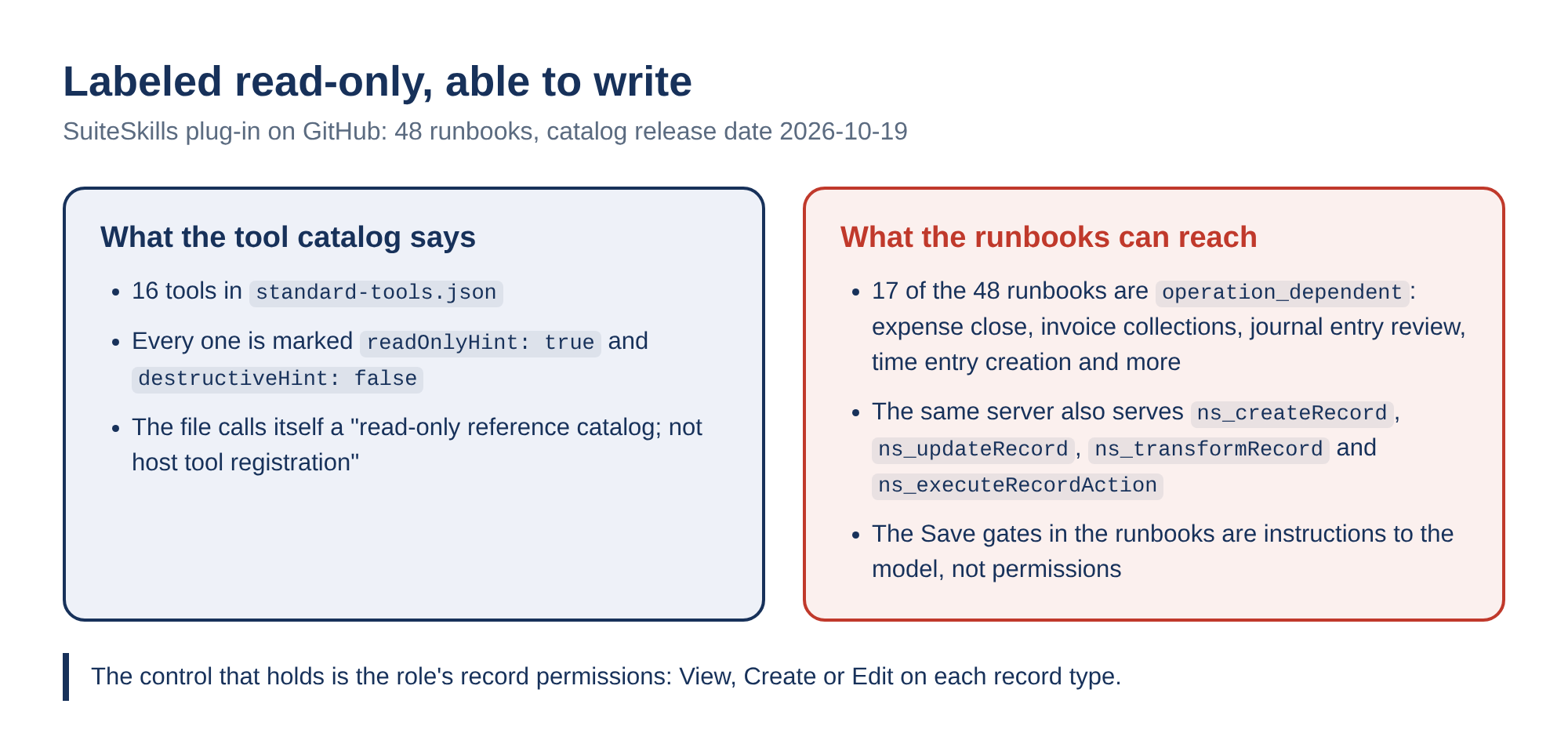
Next to it sits a tool catalog for MCP Standard Tools version 2.2.0. It describes itself as a "0.5.0 read-only reference catalog; not host tool registration" and lists 16 tools:
ns_runCustomSuiteQL     ns_getSuiteQLMetadata     ns_runReport
ns_listAllReports       ns_runSavedSearch         ns_listSavedSearches
ns_getRecord            ns_getRecordTypeMetadata  ns_getRecordActionMetadata
ns_getSubsidiaries      ns_getAccountingBooks     ns_getAccountingContexts
ns_getNexusIds          ns_prompt_library_app     ns_report_filters_app
ns_selector_app
Every entry carries the same four hints. This is ns_runCustomSuiteQL:
"annotations": {
  "destructiveHint": false,
  "idempotentHint": true,
  "openWorldHint": false,
  "readOnlyHint": true,
  "title": "Run Custom SuiteQL"
}
Now compare it with the server. The Standard Tools SuiteApp page lists 25 tools in seven groups: File Cabinet 6, Record 6, Record Action 2, Report 6, Runtime 1, Saved Search 2, SuiteQL 2. The catalog covers 13 of them, and its three _app entries are not on Oracle's list at all.
What it leaves out is every tool that can change something: ns_createRecord, ns_updateRecord, ns_transformRecord, ns_executeRecordAction, ns_attachFile and ns_detachFile. It also skips four more File Cabinet tools, ns_getRecordTransformMetadata and ns_getSessionInfo. All 25 are on the server the plug-in talks to.
Read only the catalog and you would conclude the plug-in cannot change anything. The runbooks say otherwise. In CATALOG.json, 30 runbooks are read_only, one (data visualization, which needs a local Python runtime) is local_artifacts_and_supported_reads, and 17 are operation_dependent. Those 17 include expense close, invoice collections, journal entry review, payment prioritization, time approval and time entry creation.
The shared ACTIONS.md contract states "This edition has no blanket external-write ban" and tells the model to find write capability at run time: "Tool names, readOnlyHint and Analytics metadata do not establish writability." The time entry runbook spells it out:
create_actual_time_entriesis a proposed Workforce action identifier, not a callable connector method by itself. Discover a supported create capability fortimebilland inspect its live schema and role permissions; a historical generic create tool name does not establish current availability.
The runbooks wrap writes in gates. Time entries are drafted into a table, and "Only Save on that unchanged review authorizes timebill create." The SuiteSkills README adds that "SuiteSkills does not retry changes automatically" and that Bank Reconciliation Prioritization "remains read-only." Those are instructions to the model. They are not permissions.
The connector is free, so the bill moves to your AI vendor
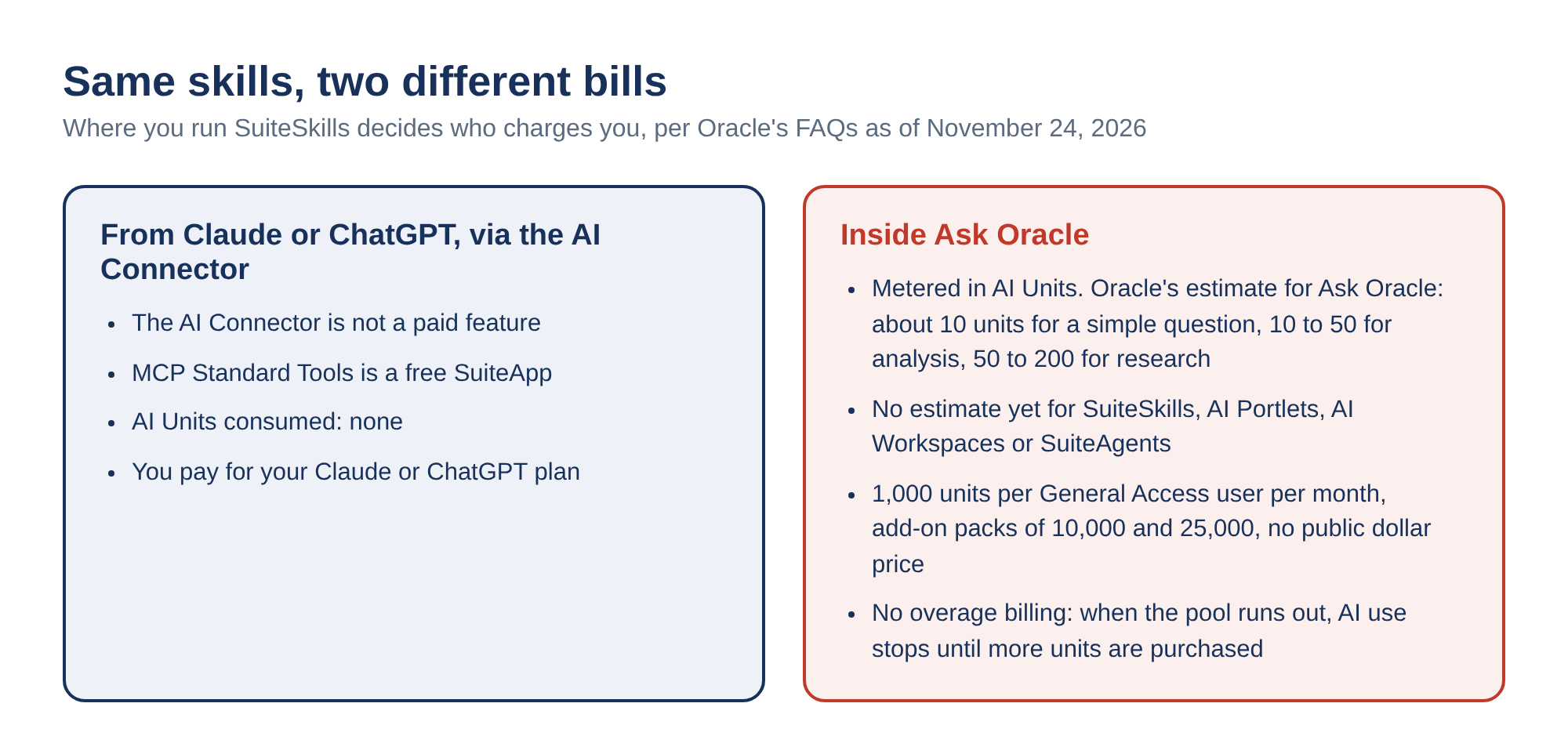
The FAQ answers the cost question directly: "The NetSuite AI Connector Service is not a paid feature and the MCP Standard Tools is a free SuiteApp. However, you may need a paid subscription for your AI client."
AI Units do not apply on this route. The AI Units FAQ says "The NetSuite AI Connector will not consume AI Units", and the NetSuite Next FAQ repeats it for any external AI service. A SuiteSkills runbook run from Claude or ChatGPT costs you a Claude or ChatGPT subscription and nothing on the NetSuite invoice.
Do the same kind of work inside Ask Oracle and the meter starts. The AI Units and features page estimates Ask Oracle at roughly 10 units for a simple question, 10 to 50 for an analysis question and 50 to 200 for a research question. It has no estimate for SuiteSkills, AI Portlets, AI Workspaces or SuiteAgents.
Each General Access user brings 1,000 units a month into the pool, add-on packs come in 10,000 and 25,000, and Oracle still publishes no dollar price for them. Since October 28 the AI Units FAQ has added three answers that matter here:
- AI Portlets are metered. They "consume AI Units when they run a query, on the initial run, when the user clicks Refresh, or when a new query runs after prompt or filter changes. Returning to the page and viewing cached results does not consume additional units."
- There is a usage page. "Go to Setup > Company > AI Unit Usage."
- There is no overage. "When your account runs out of AI Units, AI tasks already in progress are allowed to finish. The system restricts further use of AI capabilities until additional AI Units are purchased. NetSuite does not bill overage charges for AI Units."
So the risk inside Ask Oracle is not a surprise invoice. It is a month where AI features stop until someone buys a pack. The connector route does not draw from that pool at all. Our AI Units breakdown covers the pool in detail.
The connector has one limit that does cost you: concurrency is "shared with other integrations." The FAQ warns that an AI client "may generate multiple requests per action", and when the limit is exceeded the requests fail with "Too Many Requests". Your existing integrations and a finance analyst asking Claude about variance draw from the same pool. The client has its own ceiling too: AI clients "usually support up to ~5,000 rows per call", token limits may apply, and large queries may time out.
Most of the keynote needs NetSuite Next, and some of it is not live at all
The Autonomous Suite release carries one passage that sorts every announcement: "SuiteSkills, AI Portlets, AI Workspaces, and select industry-specific SuiteAgents are now available in all markets where NetSuite Next is available. Other Autonomous Suite capabilities are planned for a future NetSuite release in all markets where NetSuite Next, Ask Oracle, and NetSuite Data Intelligence are available."
As of November 24:
| Announcement | Oracle's wording | The catch |
|---|---|---|
| SuiteSkills | Now, where NetSuite Next is available | The GitHub download is offered to all customers |
| AI Portlets | Now, where NetSuite Next is available | No Help Center topic yet; the AI Units FAQ now says when they consume units |
| AI Workspaces | Now, where NetSuite Next is available | No Help Center topic; Autonomous Close "will help" |
| SuiteAgents: Software, Product, Construction | "now available in NetSuite Next" | Used through Ask Oracle |
| SuiteAgents: Services, Healthcare, Nonprofit | "planned for a future release" | "Release timing is subject to change" |
| SuiteAgent Studio | Future | No Help Center topic; an Ask Oracle core skill added in October already guides users through custom agent configurations in Agent Studio |
| SuiteAgent Management Workspace | Future | |
| SuiteFlow Agent | Future | |
| Ask Oracle Connectors (MCP client) | "will be able" | Today: "Ask Oracle does not browse the public internet" |
| NetSuite Data Intelligence | Future | The new name for NetSuite Analytics Warehouse |
| SuiteExpress | "available now" | Software-industry customers in the US and Canada only |
| NetSuite for Construction | Planned | "limited U.S. rollout initially" |
None of the October 26 releases announces general availability for NetSuite Next, and the November monthly release note opens with the same caveat: "NetSuite Next is being made available to customers in phases, so these features may not yet be available in your account." The NetSuite Next FAQ adds that administrators "will see an in-application banner when your account is eligible." If yours have not seen it, nothing in the first four rows of that table is in your account yet.
The GitHub plug-ins are the exception: they never needed NetSuite Next. Our release timeline tracks the phases.
Give the plug-ins their own role before anyone installs them
The plug-in is instructions and the role is access, so the decision that matters is made in Setup > Users/Roles, not in a marketplace. The time entry runbook says it outright: "This skill grants no NetSuite access."
Oracle's release note, updated November 16, promises that SuiteSkills workflows "respect your existing NetSuite role permissions and require your explicit authorization before making any change." Those are two different mechanisms. The first half is NetSuite enforcing the role. The second half is the runbook's Save gate plus the client's prompt: when a tool is called, "The client then shows a pop-up asking for permission to use an external integration tool." Neither of those is a NetSuite permission.
The Standard Tools page draws the same line: "A tool is visible only if your NetSuite role has all the required permissions for that tool. However, access to data and the ability to execute tool actions still depend on your NetSuite role and permissions." And the FAQ: "Tools can't run as administrators, can't call external APIs and can't run elevated scripts. They run with user role permissions only."
For the six Record tools, the Help Center lists a single permission against the whole group: REST Web Services (Full). The permission that lets the model call ns_getRecord is listed for ns_createRecord and ns_updateRecord too. Once a role can read records through the connector, the permission layer between an operation_dependent runbook and a write is that role's record-level access: View versus Create or Edit on each record type. The runbook's Save gate sits on top, as an instruction.
And the catalog will not tell you which record types matter. In CATALOG.json, 45 of the 48 runbooks have role_permissions set to "not_collected", and the other three carry no requirements block at all. Oracle has not published a permission list per runbook, so you have to build it.
That is why a person's everyday role is the wrong role to authorize. A controller's role is shaped for the controller's job, and every runbook would inherit all of it.
Build a non-administrator role for connector use, grant MCP Server Connection, OAuth 2.0 Access Tokens and REST Web Services, and set the record permissions at View everywhere you want the runbooks to stay analytical.
Raise individual records to Create or Edit when someone asks for a specific write runbook and you have read what it does. We went through the same reasoning for agents in general in NetSuite AI agent permissions, and for Ask Oracle in NetSuite Next access control.
The November release widens who this applies to. Administrators "can now customize the Employee Center role" to use the AI Connector, with MCP Server Connection, Log in using OAuth 2.0 Access Tokens and REST Web Services set to Full. Oracle notes that "These permissions have a default level of None and Administrators should grant them only when needed" and that "The Employee Center role continues to limit access to the records and actions allowed by its existing permissions." The same release puts SuitePeople goals and time-off requests on REST "so that the NetSuite MCP connector can support employee and manager workflows through AI assistants." Our November release notes cover the rest of that release.
System Notes now name the AI client, but the name is whatever the client sends
Then watch it. The integration record has an Execution Log, and the FAQ lists what it shows: request time, duration, status, user, HTTP response and request details, "such as HTTP method and URL path." Retention is 21 days in production and 7 in sandbox, so a quarterly review of what the AI did will only ever see the last three weeks.
The November monthly release adds a second trail, on the record itself. The AI Used column in System Notes "includes client information for record changes made through the NetSuite AI Connector Service." Oracle explains where the value comes from:
The information comes from the request's HTTP User-Agent header and appears as, for example, AI Connector Service (openai-mcp/1.0.0).
"Client values are displayed without conversion to product names." Values with unsupported characters are dropped, long ones are cut short, and changes made in the NetSuite UI leave the column empty. The column itself is older. What November added is the client name.
That makes it a useful filter and a weak witness. It lives in System Notes, next to the field change, the date and the user, rather than in a log that keeps three weeks. But a User-Agent is a string the client chooses to send. It tells you what the client called itself. It does not prove which product, model or person was behind the request; the user column and the role tell you whose access was used. We added the same caveat to NetSuite AI agent permissions.
The November items, the Employee Center role included, sit in a release note headed with the NetSuite Next caveat, so check that your account has them before an audit relies on the column.