NetSuite Intelligent Close Manager: what the Custom tab fixes and what it does not
TL;DR
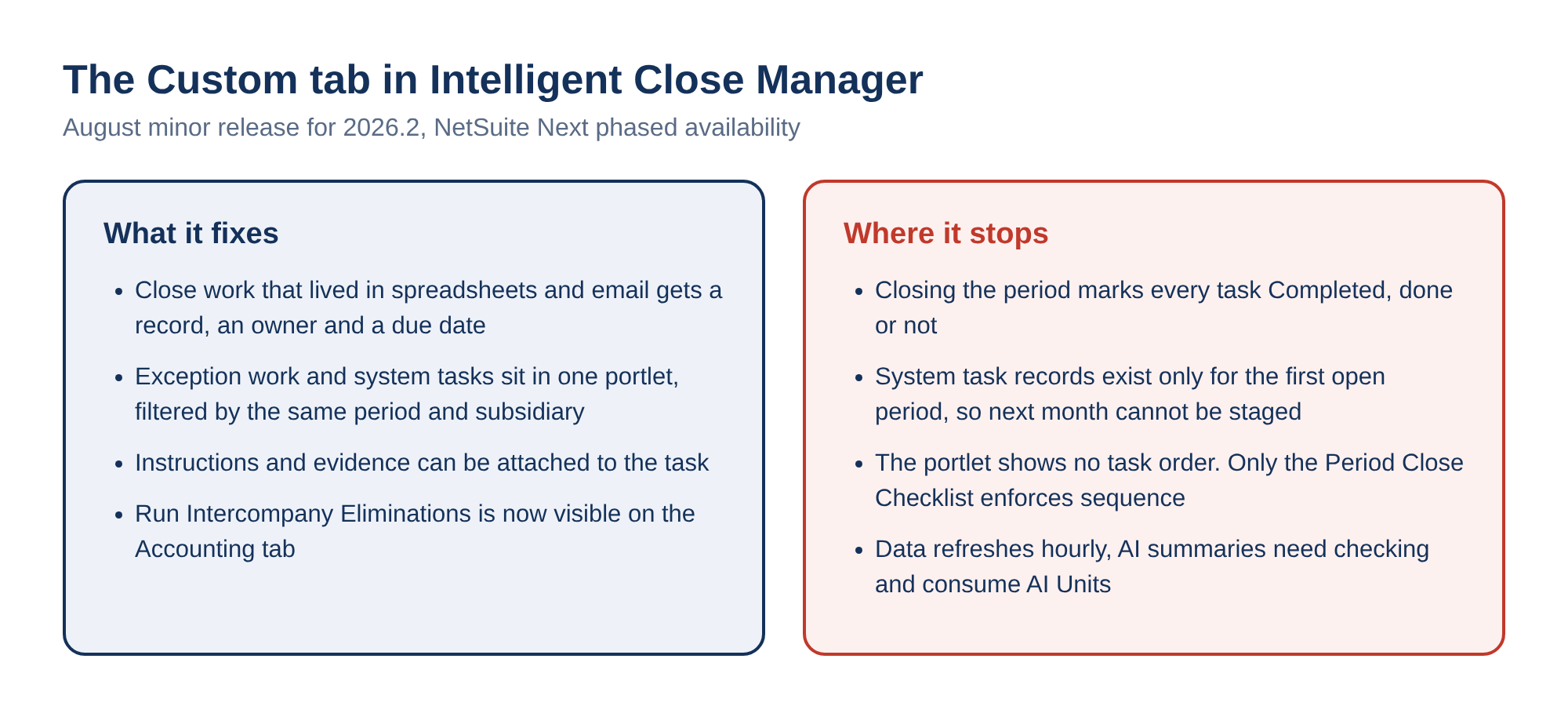
- The August minor release for 2026.2 lets you add your own close tasks to the Intelligent Close Manager portlet, on a new Custom tab, with an owner, a due date and attachments.
- That brings the close work that lived in spreadsheets and email (SOX evidence reviews, statutory packages) into the same view as NetSuite's own tasks.
- The catch: closing the period marks every task Completed, whether anyone did it or not. The status is not evidence.
- Worth setting up if you run a multi-person or multi-subsidiary close. Budget time to set real due dates, because the defaults are not a plan.
What's in this article
- Why a completed checklist proves little
- What the portlet shows out of the box
- The Custom tab and why it matters
- System tasks vs custom tasks
- How status gets set to Completed
- Run Intercompany Eliminations in the portlet
- AI close insights and their cost
- Where it stops helping
The checklist can be marked complete without the work being done
Turn on the Quick Close preference, give a role the Period Closing Management permission, and one click closes an accounting period.
Oracle's own warning on that page is worth reading slowly: Quick Close "doesn't run period closing tasks. It only marks the tasks as completed."
It is not an isolated shortcut. On Resolve Date/Period Mismatches, the help text says NetSuite permits you to mark the task complete even if transactions remain mismatched. The checklist then logs the date and the user who marked it.
The Period Close Checklist at Setup > Accounting > Manage G/L > Manage Accounting Periods is, mechanically, a log of assertions. Somebody said the task was finished. The system recorded who said it.
That is the gap the NetSuite Intelligent Close Manager is aimed at, and it is why the August minor release for 2026.2 is more interesting than its three bullet points suggest.
A close does not run late because the accounting is hard. It runs late because a local tax reconciliation is sitting with one person who is on leave, and nobody finds out until the reporting deadline has already moved. The close is a coordination problem wearing an accounting costume. Adding more automation on top of work that nobody can see just makes invisible work move faster.
Before you go looking for this in your account: the release note is the August minor release, and it carries Oracle's standard NetSuite Next banner. The functionality is being made available to customers in phases, and it may not be in your account yet. You get an in-app notification when your account becomes eligible.
If the portlet in front of you has no Custom tab, that is the likely reason rather than a missing permission. We wrote up how the phased access actually behaves in NetSuite Next and what it does to access control.
What the portlet shows before any of this is switched on
The NetSuite Intelligent Close Manager is a feature flag, not a SuiteApp. To turn it on:
- Setup > Company > Setup Tasks > Enable Features.
- Accounting subtab, Advanced Features section, check Intelligent Close Manager.
- Save. The portlet is added to your Home page automatically.
It needs the Accounting Periods feature, and a user needs the Manage Accounting Periods permission at View level or higher to see anything in it.
Two filters sit at the top:
- Period defaults to your current accounting period, or to the previous one if that period is still open or locked.
- Subsidiary defaults to the parent.
Change either and you have to click Update before the portlet reflects it. The data behind it refreshes every hour, and the portlet carries a timestamp showing the last refresh.
Tasks are organised across tabs:
| Tab | What it covers |
|---|---|
| A/R | Customer payments and invoicing: posted invoices, invoices pending approval, sales orders unbilled or partially billed, billable subscription charges at the Ready stage, released payment holds, exceptions of the Incorrect Amount type |
| A/P | The same for vendor bills and vendor payments, plus two categories that are easy to miss: in-transit items, and projected items of the Missing Transaction type |
| Accounting | Journal work, amortization and expense allocation entries, currency revaluation, consolidated exchange rates |
Next to each of these sits an Estimated Impact amount, always in the subsidiary's base currency. If the underlying transaction was raised in a foreign currency, the figure is converted using the transaction's entered rate or the most current rate available.
Treat it as an order of magnitude for triage, not as a number to quote in a meeting. For open foreign currency items it will not be the same number an hour later.
This is a decent triage board, and before August it was only that. Everything on it was generated by NetSuite from NetSuite activity.
The Custom tab is the change worth having
You can now create close tasks yourself at Lists > Accounting > Close Manager Tasks > New:
- Give it a name and pick an assignee. Optionally check Send Email to notify them.
- Set a status, pick a subsidiary if you are on OneWorld, and pick an accounting period.
- Set a start date and due date in the Schedule section.
- Put instructions and attachments on the Message and Communication tabs.
Custom tasks default to the General category and land on a Custom tab in the portlet, tracked next to the system-generated ones.
Oracle's own examples of what belongs there are more revealing than the feature description: Review SOX Control Evidence, and Submit Local Statutory Reporting Package. Those are exactly the activities that have been living in a spreadsheet, an email thread, or one controller's memory.
The significance is not that NetSuite gained a to-do list. It is that the exception path and the standard path are now in the same object model:
- filtered by the same period and subsidiary,
- visible to the same people,
- with an owner and a due date attached.
The finance team stops running two systems, one for the official close and one for the work that actually creates the risk. That is the whole argument for this release, and it is worth being precise about how far it goes.
A system task and a custom task are not the same kind of thing
Both appear as close manager task records, and they behave differently in a way that matters the first time you try to assign work.
| System task record | Custom task record | |
|---|---|---|
| Created by | NetSuite, by grouping tasks that share a task name, accounting period and subsidiary | You |
| Tasks per record | Many. Seven sales orders pending billing for US Company in January give one Invoice sales orders record, and the Tasks column shows 7 | One |
| New work of the same kind | Attaches to the existing record | Not applicable |
| Read-only fields | Task Name, Task Type, Task, Category, Subsidiary, Accounting Period | |
| Default dates | A/R and A/P: due date = start date. Accounting: period end date, unless that is earlier than the start date | First and last day of the first open accounting period |
What you can edit, on either type, is the coordination layer: Assigned To (blank by default), Send Email, Status, Start Date, Due Date and Date Completed. Those fields are editable while the record's accounting period is open or locked.
Watch the date defaults, because they are not a plan. For A/R and A/P tasks the due date defaults to the start date, which means everything arrives already due. Someone has to set real dates, deliberately, or the board will be uniformly red by day two and will tell you nothing.
Send Email has a small prerequisite with a sharp edge: the assignee must have a valid email address on their record before you can save the task.
Status is written by the system, and closing the period counts as done
This is the part to understand before anyone builds a control around the Custom tab.
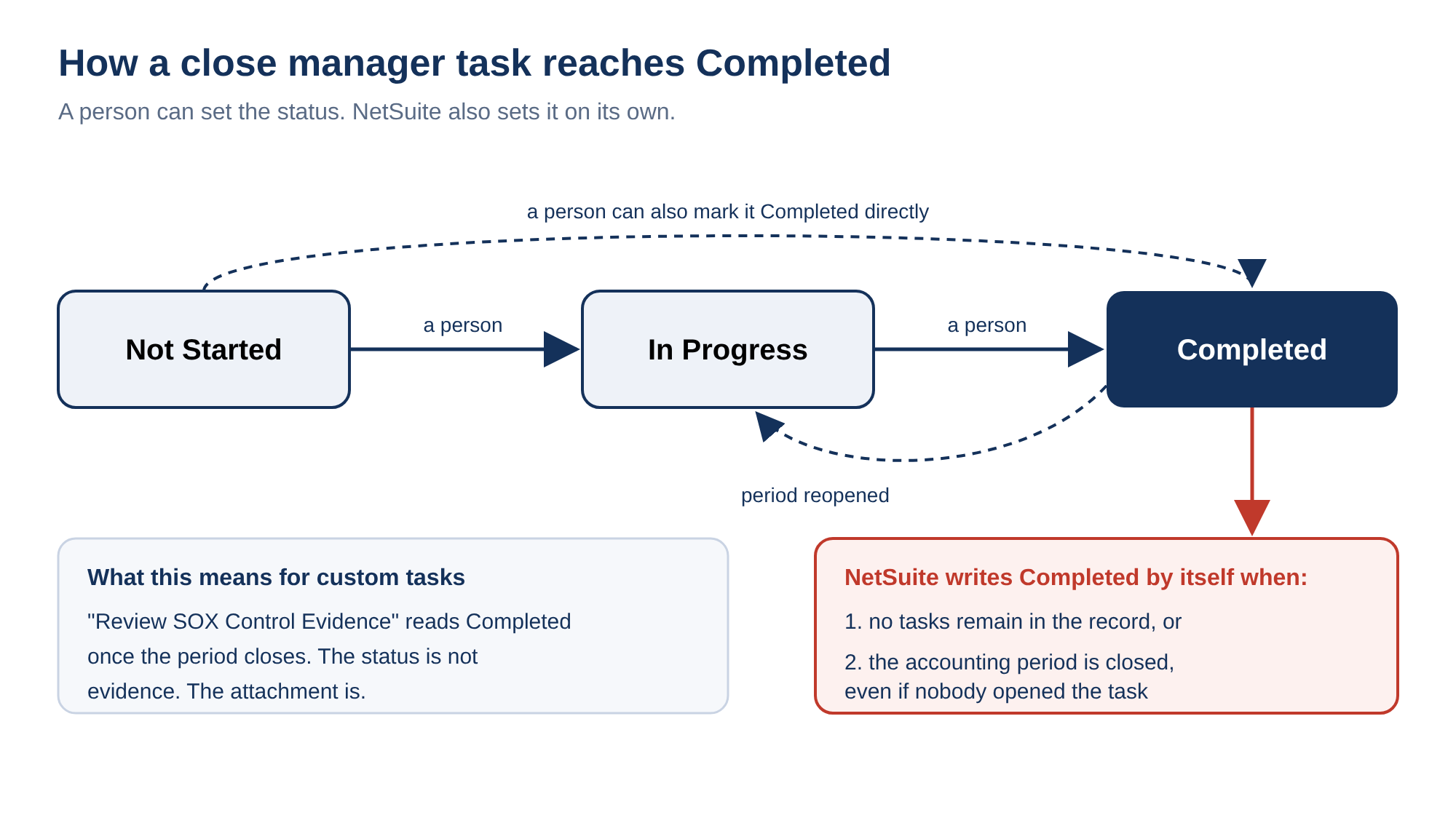
A task record starts at Not Started. A person can move it to In Progress or Completed. NetSuite also writes Completed by itself in two situations:
- when no tasks remain in the record,
- when the record's accounting period is closed.
If the period is later reopened, completed records go back to In Progress.
Read that second trigger again. Closing the period marks the task complete. A custom task named Review SOX Control Evidence, assigned to a person who never opened it, reads Completed because the period closed around it.
For system-generated records this is defensible, since the underlying work items really are gone once the period shuts. For custom tasks it is the same behaviour the Period Close Checklist already had, carried into the new tab.
The portlet has made exception work visible, which is real progress. It has not made completion mean anything more than it meant before. The Date Completed field it stamps is populated automatically from the status change rather than from anybody doing anything.
If you want evidence that a review happened, the evidence is still the attachment on the Communication tab, or a record elsewhere. It is not the status.
Run Intercompany Eliminations came into view, not into reach
The third item in the release note is that the Accounting tab now includes the Run Intercompany Eliminations task.
Until now, that process had exactly one door. Oracle's help says it plainly: you can run the intercompany elimination process only from the Period Close Checklist, and only after the other period closing tasks are done.
The order matters because Revalue Open Foreign Currency Balances and Calculate Consolidated Exchange Rates determine the gains and losses that post to the Cumulative Translation Adjustment - Elimination account. Run it too early and the adjustment is wrong.
Surfacing the task in the portlet is useful: a OneWorld controller can now see that eliminations are outstanding without leaving the dashboard.
It also removes a guard rail from the field of view:
- The checklist enforces sequence with lock icons on actions whose prerequisites are unmet, and tells you what the prerequisite is when you point at the lock.
- The portlet is a flat list of tasks with amounts against them. Nothing in it expresses that one task must follow another.
The same caution applies further down the A/P tab, where the portlet's counts and the general ledger can disagree for reasons that have nothing to do with anyone being late. If your A/P numbers do not tie, that is a different investigation, and we covered the usual causes in why NetSuite A/P aging does not match the GL.
Insights are a summary you still have to check, and they are metered
From the portlet you can click Generate Insights and get an Intelligent Close Summary dialog. It can contain an overall view of close progress and task coverage, plus A/R and A/P sections about those close activities.
The switch behind it is the Enable Narrative Insights preference on the AI Preferences page. It is on by default, and an administrator can turn it off.
Oracle attaches an unusually direct disclaimer: the content is generated using AI, may not be free of errors or fully accurate, and you should verify the summary by reviewing the underlying reports and records.
Narrative Insights also produces different text on different runs against unchanged data. That rules out one tempting use straight away: this is not something to paste into a close package, an audit file or a board pack.
There is also a running cost. Narrative Insights consumes AI Units:
- Oracle does not publish a figure for the Intelligent Close Summary specifically.
- The closest published estimate is for a Narrative Insights generation on a customer record, at 5 to 200 units, with Oracle's own note that actual consumption may vary.
- AI Units come from a term allowance, they do not carry over, and consumption is visible at Setup > Company > View Billing Information.
A controller who regenerates the close summary a few times a day through a busy week is spending a metered resource that was provisioned for the whole term. We went through how that pool is sized and priced in what NetSuite AI Units actually cost.
Where this stops helping
You cannot stage next month. System task records exist only for the first open accounting period. That is deliberate, and Oracle says why: so you focus on the current close cycle.
If January is your first open period and February already has vendor bills pending approval, those February tasks appear in the portlet when you filter to February. But no task record exists for them, so there is nobody to assign and no due date to set. The records appear when January closes and February takes its place.
Task links follow the same rule. They are available only when the portlet is filtered to the first open accounting period and you are on the Prioritized tasks tab. From anywhere else, you are looking at numbers, not at something you can open and hand to a person.
Then the smaller edges, which add up on the last day of a close:
- The portlet refreshes hourly, so it is a management view and not a cutoff monitor.
- Task records are editable only while the period is open or locked.
- Custom tasks sit on their own tab under the General category rather than inside A/R, A/P or Accounting, so the exception work is adjacent to the standard work rather than interleaved with it.
- Estimated Impact moves with the exchange rate.
- The period is still closed from the Period Close Checklist, with the same Quick Close shortcut sitting next to it.
None of that makes the release less worth having. It does mean the portlet is a visibility layer over a close process whose completion semantics have not changed.
It tells you where the work is. It does not tell you that the work was done, and on the day the period closes it will tell you the opposite with complete confidence.