mokubot · release notes · suitescript 2.1
MokuBot 1.6: SuiteScript 2.1 Readiness, License Analyzer and Claude Desktop
MokuBot 1.6 adds a SuiteScript 2.1 readiness report, a license analyzer for idle paid seats, dependency graphs, and a Claude Desktop connector for NetSuite.
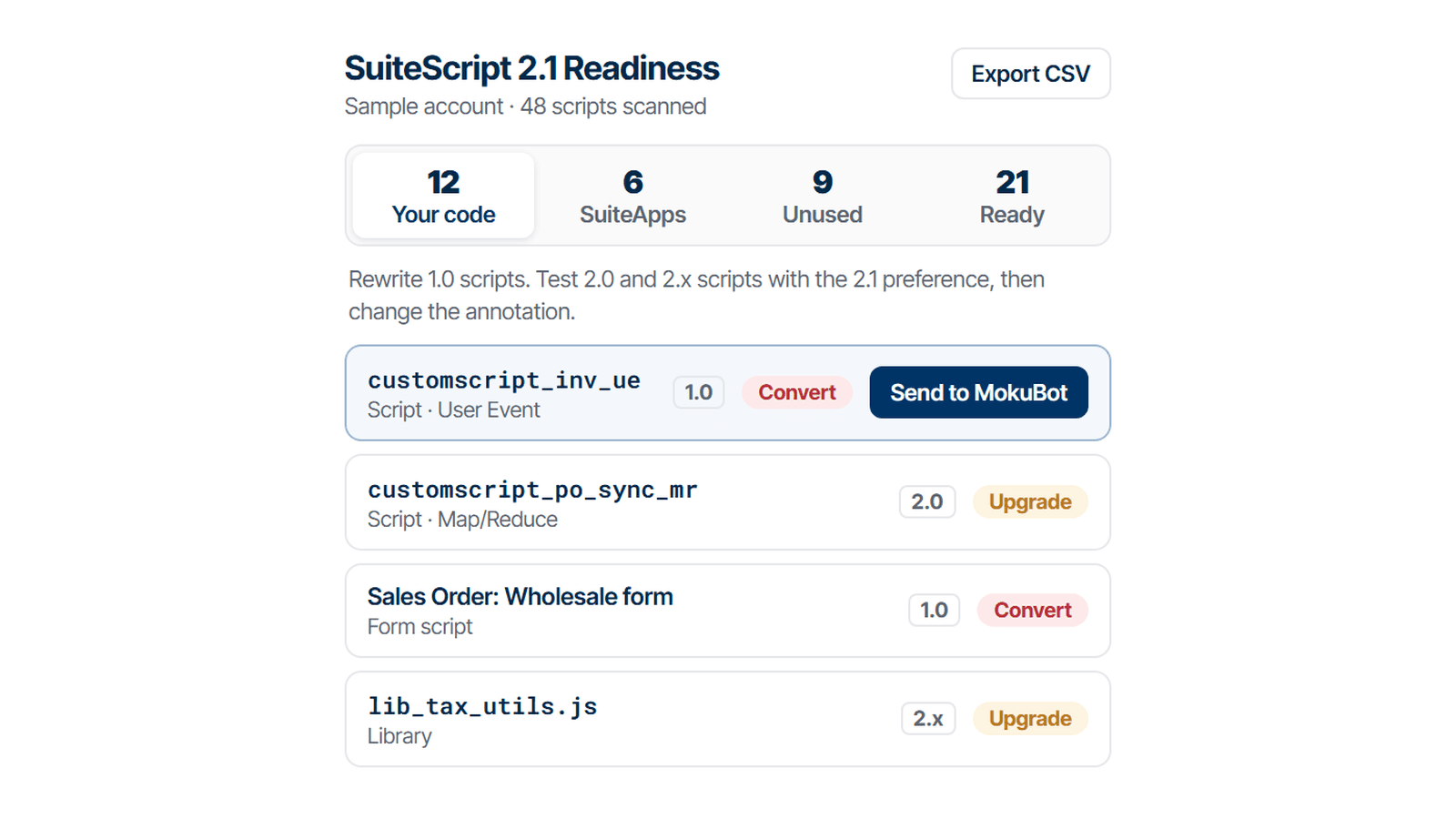
The banner tells you there is work, not what the work is
An administrator logs in, sees "Update Needed: Update Scripts to SuiteScript 2.1", and opens the Scripts list. The API version column gives a number. The number mixes code the company wrote, code a SuiteApp vendor shipped, scripts nobody has deployed in years, and libraries that do not have a script record at all. Someone has to turn that into a plan before 2028.2, when Oracle stops running anything older than 2.1.
That gap between the count and the plan is what most of MokuBot 1.6 is about. The release adds three reports under Tools in the sidebar (SuiteScript 2.1 Readiness, License Analyzer, Dependency Audit), a connector that lets Claude Desktop work in your NetSuite account under rules you set per account, and a new model tier. The current build is 1.6.2; 1.6.1 and 1.6.2 are bug-fix releases on top of 1.6.0, so everything below shipped in 1.6.0.
The Readiness report sorts scripts by what you have to do, not by version
The SuiteScript 2.1 Readiness report scans every script in the account and gives each one an action. The actions are the useful part, because they split the four-figure number into work that belongs to different people:
| Action | When it applies |
|---|---|
| Ready | The script already runs as 2.1. |
| Retire | Inactive, not deployed, no deployments, or a workflow action script that no workflow references. |
| Vendor | The script belongs to NetSuite or to an installed SuiteApp. The publisher updates it, not you. |
| Convert | Your SuiteScript 1.0 code. A rewrite, not an annotation change. |
| Upgrade | Your 2.0 or 2.x code. Usually an annotation change plus testing. |
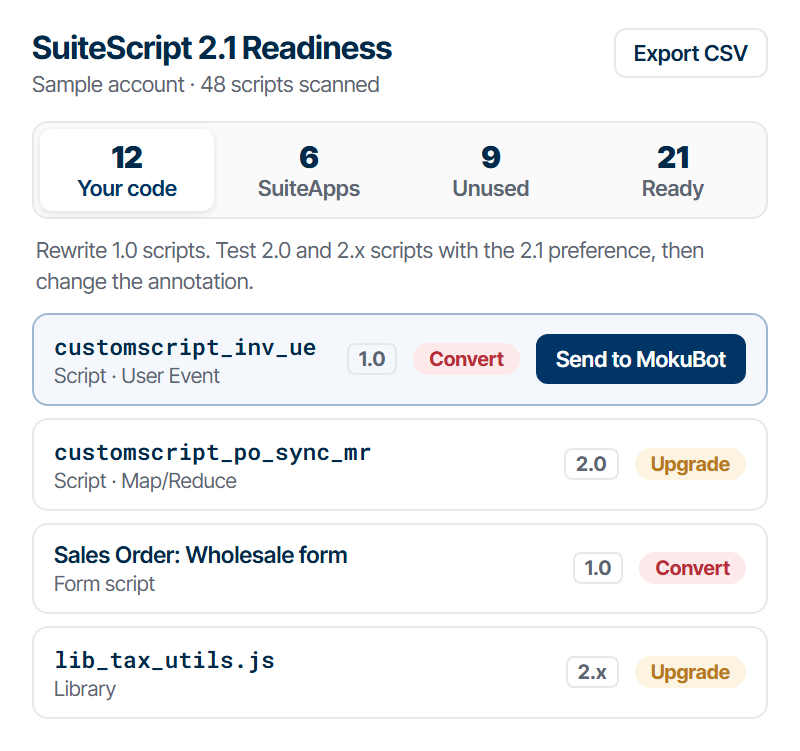
Sample account. The tabs at the top are the same split: your code, SuiteApps, unused, ready.
Each row also carries a usage class. A script is "In use" if it has a live deployment (released, scheduled or testing) or wrote a log in the last 30 days. Scheduled and map/reduce scripts that are deployed but not scheduled are "On demand", because someone may still run them by hand. The 30-day window is not arbitrary: NetSuite keeps script execution logs for about that long, so anything older is not visible to any query.
Effort is a rough size estimate from the file: under 10 KB is small, under 50 KB is medium, the rest is large. It is meant for ordering a backlog, not for quoting hours.
What the scan reads that the Scripts list does not
The report starts with SuiteQL against the script, scriptdeployment and scriptnote tables, then runs a deep scan that opens the files themselves. That second step is where the list changes:
- A file annotated
@NApiVersion 2.xis stored withapiversion2.0. The deep scan reads the annotation, so 2.0 and 2.x show up as separate versions instead of one. - Libraries are found by following
define()dependencies from each script, and the Libraries tab of 1.0 scripts. A library with no@NApiVersionruns as whatever version loads it. For those the report says to make the library 2.1 compatible first and annotate it 2.1 only after every script that loads it runs as 2.1. Annotating it earlier breaks the 1.0 callers. - Form-level client scripts are included. They sit on a form's Custom Code tab and have no script record, so the Scripts list never shows them.
- Workflows are scanned last. A workflow formula that calls a SuiteScript 1.0 API gets a Review action, since it breaks the same way a 1.0 script does.
- SuiteApps installed through SDF have no
frombundlevalue, only a publisher ID and package. The scan checks both, which is how SDF SuiteApp scripts land in the Vendor bucket instead of yours.
The whole report exports to CSV, with every column plus the deep scan details. Our earlier article on building the real 2.1 inventory by hand walks through the same traps with the raw SuiteQL, if you want to check the numbers yourself.
Send to MokuBot turns a row into a migration plan
Every row has a Send to MokuBot button. It opens a chat with that script and asks for a plan to migrate it to 2.1. From the same chat you can ask MokuBot to upgrade a 1.0 script to 2.1. The report decides what to work on; the chat does the work one script at a time.
The dates the report is built against are Oracle's published schedule. In 2026.2, 2.1 became the standard. In 2027.1, 1.0 drops to end-of-life support with fixes for critical issues only. In 2028.1, 1.0 scripts can no longer be deployed in new accounts, and 2.0 and 2.x scripts run as 2.1 by default. In 2028.2, every script has to be 2.1. The full release timeline has the sources.
Our view: the first deliverable of a 2.1 project should be the Retire and Vendor lists, not a converted script. Those two buckets cost nothing to act on (deactivate, delete, or email a publisher), they usually shrink the problem by a lot, and they make the estimate for the remaining Convert and Upgrade rows honest. Starting with a rewrite of the oldest file in the account risks spending the first weeks on code that was never running.
License Analyzer finds paid seats nobody uses
The second report answers a question that comes up every renewal: how many of the users we pay for actually sign in?
License Analyzer treats a seat as paid when the employee record is active, has Give Access checked, and has at least one role that is not a customer, vendor or partner center role. If every role on the user is an Employee Center role, it counts as an Employee Center seat; otherwise it is a full seat. Users whose paid roles are all web services only roles are flagged as integration users, so you do not mistake an integration account for an idle person.
The last sign-in comes from the login audit trail, the loginaudit table, counting only successful logins over a lookback of up to 400 days. Token-based access counts as a sign-in too (REST, SOAP, RESTlets, the IDE), which matters for integration users that never open the UI. If the role running the scan cannot read the login audit trail, the report stops with an error instead of reporting everyone as inactive.
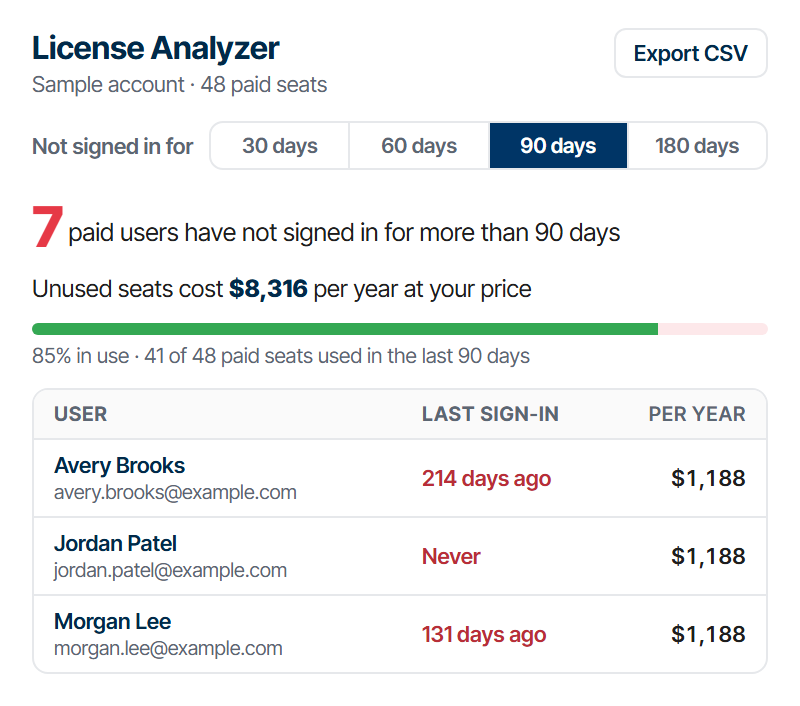
Sample account with made-up prices. Your numbers depend on the prices you enter.
You pick the threshold (30, 60, 90 or 180 days) and get the list of paid users past it, with what those seats cost per year. The prices are yours to enter. The defaults are placeholders, $129 a month for a full seat and $10 for Employee Center, because NetSuite pricing is contract-specific and no public list price would be right for your account. The list exports to CSV for whoever owns the renewal.
What it does not do: it does not deactivate anyone or change roles. It is a read-only report, and the decision about who gives up a seat stays with a person.
Dependency Audit shows what a change will touch
Dependency Audit starts from a record type, or from a scheduled or map/reduce script, and draws what it touches as an interactive graph: scripts, workflows, files, NetSuite modules and saved searches, by default two levels deep and up to four. Graphs are capped at 500 nodes by default.
The part that is easy to overlook is compare. Run an audit, change something, run it again, and the two audits can be compared to show what changed. That is a quick check after a deployment, or before you retire a script the Readiness report marked as unused.
On Pro and higher, AI Analysis reads the graph (up to 100 nodes per run) and flags likely issues with a severity of info, warning or critical, each with a recommendation.
Claude Desktop can now work in NetSuite, with your rules per account
On Pro and higher plans, MokuBot can act as an MCP server for Claude Desktop. The setup lives under Tools, then MCP: download the connector from the panel, install it in Claude Desktop under Settings, Extensions, Advanced settings, Install plugin, then turn on Enable MCP and open a NetSuite tab.
The permission model is the part worth reading before you connect a production account:
- Each NetSuite account gets its own access setting: read-only, all write categories, or selected categories (records, scripting and files, saved searches, custom record types and fields, role management, UI interactions).
- When Claude asks for new permissions on an account, the request waits in the panel until you approve it.
- A write to an account that looks like production is refused until you approve it. The approval is for that one write or for the current session, never permanent, so a new session starts locked again.
- On a production account that is not read-only, the panel suggests switching to read-only. Delete operations are a separate checkbox and are off unless you turn them on.
- Local data access, which lets Claude read your MokuBot dashboards and chats, is off until you switch it on.
Up to 64 sessions can be connected at the same time. If you run several Chrome profiles, each one can have a profile label so the client can tell them apart. We wrote separately about how much access an AI agent should have in NetSuite; the defaults here follow that article: read first, write only where you said so.
Smaller changes that will show up in daily work
SuiteQL Workbench in MokuStudio now autocompletes table and field names and keeps saved queries, so a query you wrote last week is one click away instead of buried in a chat.
Advanced PDF/HTML templates can be read, previewed against a real transaction, edited, and printed from MokuBot. Editing and printing need write access turned on in Settings; reading and previewing do not.
The model lineup was updated to the current Claude models: Fastest runs Claude Haiku 5.5, Optimal runs Claude Sonnet 5.5, Smartest runs Claude Opus 5.5. A new Ultra tier on Pro+ and Max runs Claude Fable 5.1, the most capable model in the lineup.
Long chats now summarize older context on their own instead of hitting a wall. Settings, Long chats lets you choose Economy (summarizes earlier, lowest cost), Balanced (the recommended default) or Max (keeps more history before summarizing, and costs more on very long chats).
Where to start
If you have twenty minutes: install or update MokuBot, open Tools in the sidebar, and run the 2.1 Readiness report on a sandbox. Read the Retire and Vendor tabs before anything else. If the renewal is coming up, run License Analyzer with your own prices at the 90-day threshold and send the CSV to whoever signs the contract. Connect Claude Desktop last, read-only first, and widen it per account once you have seen what it asks for.